Referenzen
Das Paket tact-js stellt Funktionen zur Steuerung von bHaptics-Haptikgeräten aus JavaScript bereit. Es ermöglicht Ihnen, haptische Pattern abzuspielen, Gerätemotoren direkt zu steuern und die Haptik-Wiedergabe zu verwalten.
import Tact from "tact-js";
Ereignisbasierte Haptik abspielen
Spielen Sie haptische Pattern ab, die an bestimmte Ereignisse gebunden sind (entworfen im bHaptics Designer/Portal). Dies sind die empfohlenen Funktionen für die meisten Anwendungen.
play
play({ eventKey, startTime, intensityRatio, durationRatio, offsetX, offsetY, deviceIndex }: PlayParams): Promise<void>;

type PlayParams = {
  eventKey: string;         // Name of the haptic event
  startTime?: number;       // Playback start position in milliseconds
  intensityRatio?: number;  // Intensity multiplier [0.0 - 2.0]
  durationRatio?: number;   // Duration multiplier
  offsetX?: number;         // Rotation offset [0.0 - 360.0]
  offsetY?: number;         // Vertical offset [-0.5 - 0.5]
  deviceIndex?: number;     // Target device index
};
Spielt das vordefinierte haptische Ereignis ab.
Parameter
eventKey: Name des haptischen Ereignisses.startTime(optional): Wiedergabe-Startposition in Millisekunden — die erstenstartTimeMillisekunden des Ereignisses werden übersprungen. Wird beispielsweise ein 3.260 ms langes Ereignis mitstartTime: 2000abgespielt, werden nur die letzten 1.260 ms wiedergegeben. (Standard:0)intensityRatio(optional): Multiplikator für die haptische Intensity. Gültiger Bereich: [0.0-2.0] (Standard:1.0)durationRatio(optional): Multiplikator für die Duration. (Standard:1.0)offsetX(optional): Dreht die Haptik gegen den Uhrzeigersinn. Gültiger Bereich: [0.0-360.0] (Standard:0.0)offsetY(optional): Bewegt die Haptik nach oben oder unten. Gültiger Bereich: [-0.5-0.5] (Standard:0.0)deviceIndex(optional): Index des Zielgeräts, wenn mehrere Geräte desselben Positionstyps verbunden sind. (Standard:-1, kein bestimmtes Gerät)
Rückgabewert
Das Promise wird ohne Wert (undefined) erfüllt, sobald die Anfrage an den bHaptics Player gesendet wurde.
Beachten Sie, dass es auch dann normal erfüllt wird, wenn der Event-Key nicht registriert ist — in diesem Fall wird nichts abgespielt und es wird kein Fehler ausgelöst. Verwenden Sie getEvent, um zu prüfen, ob ein Event-Key existiert.
Beispiel
import Tact from "tact-js";

const playExample = async () => {
  await Tact.play({ eventKey: "heartbeat" });
};

const playMoreExample = async () => {
  await Tact.play({
    eventKey: "hit",
    startTime: 0,
    intensityRatio: 1.0,
    durationRatio: 1.0,
    offsetX: 180.0,
    offsetY: 0.25,
  });
};
playLoop
playLoop({ eventKey, intensityRatio, durationRatio, interval, maxCount, offsetX, offsetY, deviceIndex }: PlayLoopParams): Promise<number>;

type PlayLoopParams = {
  eventKey: string;        // Name of the haptic event
  intensityRatio?: number; // Intensity multiplier [0.0 - 2.0]
  durationRatio?: number;  // Duration multiplier
  interval: number;        // Pause between repetitions (milliseconds)
  maxCount: number;        // Total number of plays
  offsetX: number;         // Rotation offset [0.0 - 360.0]
  offsetY: number;         // Vertical offset [-0.5 - 0.5]
  deviceIndex?: number;    // Target device index
};
Spielt das haptische Ereignis in einer Schleife für eine angegebene Anzahl von Malen ab.
Parameter
eventKey: Name des haptischen Ereignisses.intensityRatio(optional): Multiplikator für die haptische Intensity. Gültiger Bereich: [0.0-2.0] (Standard:1.0)durationRatio(optional): Multiplikator für die Duration. (Standard:1.0)interval: Pause zwischen den Wiederholungen in Millisekunden, gemessen vom Ende einer Wiedergabe bis zum Beginn der nächsten. Beispielsweise endet ein 460 ms langes Ereignis mitinterval: 500undmaxCount: 3nach etwa 2.380 ms (460 + 500 + 460 + 500 + 460).maxCount: Gesamtanzahl der Wiedergaben des haptischen Ereignisses, einschließlich der ersten Wiedergabe. Werte kleiner als1verhalten sich wie1.offsetX: Dreht die Haptik gegen den Uhrzeigersinn. Gültiger Bereich: [0.0-360.0] (Standard:0.0)offsetY: Bewegt die Haptik nach oben oder unten. Gültiger Bereich: [-0.5-0.5] (Standard:0.0)deviceIndex(optional): Index des Zielgeräts, wenn mehrere Geräte desselben Positionstyps verbunden sind. (Standard:-1, kein bestimmtes Gerät)
Rückgabewert
Request-ID, die diese Wiedergabeanfrage identifiziert.
Beachten Sie, dass auch dann eine Request-ID zurückgegeben wird, wenn der Event-Key nicht registriert ist — in diesem Fall wird nichts abgespielt. Um ein in Schleife laufendes Ereignis zu stoppen, verwenden Sie stop mit dem Event-Key oder stopAll.
Während die Schleife läuft, gibt isPlayingByEventKey für die gesamte Dauer true zurück, einschließlich der interval-Pausen zwischen den Wiederholungen.
Beispiel
import Tact from "tact-js";

const playLoopExample = async () => {
  const requestId = await Tact.playLoop({
    eventKey: "hit",
    intensityRatio: 1.0,
    durationRatio: 1.0,
    interval: 1000,
    maxCount: 5,
    offsetX: 0.0,
    offsetY: 0.0,
  });

  console.log(`Playback request ID: ${requestId}`);
};
Haptik direkt abspielen
Wenn Sie Haptik ohne Ereignisse abspielen möchten, verwenden Sie diese Funktionen.
playDot
playDot({ position, motorValues, duration, deviceIndex }: PlayDotParams): Promise<number>;

type PlayDotParams = {
  position: PositionType;  // Device position type
  motorValues: number[];   // Array of motor intensity values [0 - 100]
  duration?: number;       // Duration in milliseconds
  deviceIndex?: number;    // Target device index
};
Spielt haptisches Feedback auf den bestimmten haptischen Aktuatoren ab.
Parameter
position: Typ des Haptikgeräts für die Wiedergabe. Siehe dasPositionType-Enum.motorValues: Array von Intensity-Werten für jeden Motor. Die Array-Länge muss mit der Anzahl der Motoren im Gerät übereinstimmen. Jeder Wert muss eine Ganzzahl sein und im Bereich liegen. Gültiger Bereich: [0-100].duration(optional): Duration des haptischen Feedbacks in Millisekunden. Ein Wert größer oder gleich100wird empfohlen.deviceIndex(optional): Index des Zielgeräts, wenn mehrere Geräte desselben Positionstyps verbunden sind. (Standard:-1, kein bestimmtes Gerät)
Rückgabewert
Request-ID, die diese Wiedergabeanfrage identifiziert. Um die Wiedergabe zu stoppen, verwenden Sie stopAll.
Beachten Sie, dass die Parameter clientseitig nicht validiert werden — eine Request-ID wird beispielsweise auch dann zurückgegeben, wenn motorValues eine falsche Länge hat oder Werte außerhalb des Bereichs enthält; in diesem Fall wird die Haptik möglicherweise einfach nicht abgespielt.
Beispiel
import Tact, { PositionType } from "tact-js";

const playDotExample = async () => {
  const requestId = await Tact.playDot({
    position: PositionType.ForearmL,  // Left TactSleeve
    motorValues: [100, 80, 60],       // TactSleeve has 3 motors
    duration: 100
  });

  console.log(`Playback request ID: ${requestId}`);
}
playPath
playPath({ position, x, y, intensity, duration, deviceIndex }: PlayPathParams): Promise<number>;

type PlayPathParams = {
  position: PositionType;  // Device position type
  x: number[];             // Array of x coordinates [0.0 - 1.0]
  y: number[];             // Array of y coordinates [0.0 - 1.0]
  intensity: number[];     // Array of intensity values [0 - 100]
  duration?: number;       // Duration in milliseconds
  deviceIndex?: number;    // Target device index
};
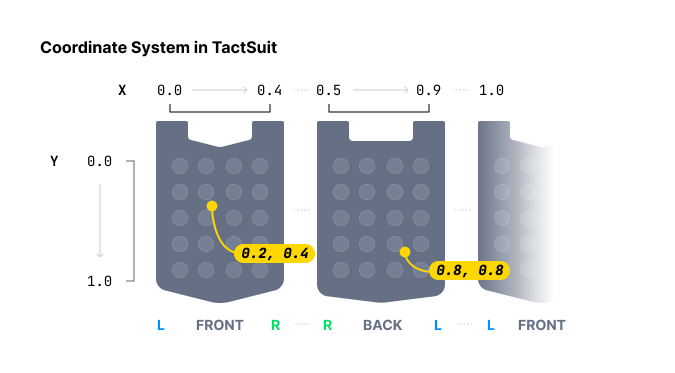
Spielt haptisches Feedback entlang angegebener Koordinaten ab. Anders als playDot, das einzelne Motoren steuert, gibt diese Methode die haptische Intensity für bestimmte Koordinaten auf dem Gerät an.
Bei der Angabe der haptischen Position bietet playDot eine diskrete Steuerung, während playPath kontinuierlicher ist. playDot weist einzelnen Aktuatoren eine Intensity zu, wohingegen playPath die Angabe einer Intensity für bestimmte Koordinaten (zwischen 0 und 1 sowohl für die X- als auch die Y-Achse) ermöglicht, wodurch die nahegelegenen Aktuatoren entsprechend vibrieren.
Sie können mehrere Koordinaten mit mehreren Intensities angeben. Beachten Sie, dass alle Aktuatoren um diese Koordinaten in der Liste gleichzeitig aktiviert werden, nicht nacheinander. Die Größe aller Arrays (x, y und intensity) muss gleich sein.
Wenn die Arrays x, y und intensity unterschiedliche Längen haben, stürzt das interne WebAssembly-Modul des SDK mit einem nicht behebbaren Fehler ab (verifiziert in tact-js 2.0.4) — die Haptik funktioniert nicht mehr, bis die Seite neu geladen wird. Stellen Sie vor dem Aufruf stets sicher, dass die drei Arrays die gleiche Länge haben.
Indem Sie diese Funktion kontinuierlich aufrufen und dabei die Werte schrittweise ändern, können Sie den Effekt eines sich bewegenden haptischen Punktes erzielen.
Parameter
position: Typ des Haptikgeräts für die Wiedergabe. Siehe dasPositionType-Enum.x: Array von X-Koordinaten für den haptischen Effect. Jeder Wert muss im Bereich liegen: [0.0-1.0]y: Array von Y-Koordinaten für den haptischen Effect. Jeder Wert muss im Bereich liegen: [0.0-1.0]intensity: Array von Intensity-Werten für jede Koordinate. Jeder Wert muss eine Ganzzahl sein und im Bereich liegen: [0-100]duration(optional): Duration des haptischen Feedbacks in Millisekunden. Ein Wert größer oder gleich100wird empfohlen.deviceIndex(optional): Index des Zielgeräts, wenn mehrere Geräte desselben Positionstyps verbunden sind. (Standard:-1, kein bestimmtes Gerät)
Rückgabewert
Request-ID, die diese Wiedergabeanfrage identifiziert. Um die Wiedergabe zu stoppen, verwenden Sie stopAll.
Beispiel
import Tact, { PositionType } from "tact-js";

const HAPTIC_PATHS = [
  {
    x: [0.738, 0.723, 0.709, 0.696, 0.682, 0.667, 0.653],
    y: [0.680, 0.715, 0.749, 0.782, 0.816, 0.852, 0.885],
    intensity: 20
  },
  {
    x: [0.061, 0.072, 0.102, 0.184, 0.254, 0.310, 0.363],
    y: [0.632, 0.587, 0.542, 0.498, 0.411, 0.366, 0.301],
    intensity: 60
  }
];

const TIME_OF_FRAME = 250; // milliseconds

const playPathExample = async () => {
  const frames = HAPTIC_PATHS[0].x.length;

  for (let i = 0; i < frames; i++) {
    await Tact.playPath({
      position: PositionType.Vest, // TactSuit Pro
      x: HAPTIC_PATHS.map(point => point.x[i]),
      y: HAPTIC_PATHS.map(point => point.y[i]),
      intensity: HAPTIC_PATHS.map(point => point.intensity),
      duration: TIME_OF_FRAME
    });
    await new Promise(resolve => setTimeout(resolve, TIME_OF_FRAME));
  }
}
playGlove
playGlove({ position, motors, playtimes, shapes, repeatCount }: PlayGloveParams): Promise<number>;

type PlayGloveParams = {
  position: PositionType;  // GloveL or GloveR
  motors: Int32Array;      // Array of 8 motor intensity values [0 - 100]
  playtimes: Int32Array;   // Array of 8 time interval values
  shapes: Int32Array;      // Array of 8 waveform values
  repeatCount: number;     // Number of times to play the pattern
};
Nur TactGlove. Spielt Haptik im TactGlove mit feingranularer Steuerung der Duration und der Intensity-Pattern ab. Dies bietet eine detailliertere Steuerung im Vergleich zu playDot.
Jeder Array-Parameter muss genau acht Elemente enthalten, eines für jeden Motor im Glove.
Parameter
-
position: Typ des Haptikgeräts für die Wiedergabe. Es mussPositionType.GloveLoderPositionType.GloveRverwendet werden. -
motors: Array von 8 Intensity-Werten, einer pro Motor. Jeder Wert muss eine Ganzzahl sein und im Bereich liegen: [0-100]Array-Index Motor befindet sich an … 0Spitze des Daumens 1Spitze des Zeigefingers 2Spitze des Mittelfingers 3Spitze des Ringfingers 4Spitze des kleinen Fingers 5Am Handgelenk 6An der Handfläche (Daumenseite) 7An der Handfläche (Seite des kleinen Fingers) -
playtimes: Array von 8 Zeitintervallwerten. Gültige Werte sind:Wert Duration 15ms 210ms 420ms 630ms 840ms -
shapes: Array von 8 Waveform-Werten, die steuern, wie sich die Intensity im Laufe der Zeit ändert:Wert Waveform-Pattern 0Konstante Intensity für die Duration 1Beginnt bei der angegebenen Intensity und nimmt um die Hälfte ab 2Beginnt bei halber Intensity und steigt auf das Maximum an -
repeatCount: Gesamtanzahl der Wiedergaben des 8-Motoren-Pattern, einschließlich der ersten Wiedergabe.
Rückgabewert
Request-ID, die diese Wiedergabeanfrage identifiziert. Um die Wiedergabe zu stoppen, verwenden Sie stopAll.
Beispiel
import Tact, { PositionType } from "tact-js";

const playGloveExample = async () => {
  const motors = new Int32Array([100, 100, 100, 100, 100, 100, 100, 100]);
  const playtimes = new Int32Array([8, 8, 8, 8, 8, 8, 8, 8]);
  const shapes = new Int32Array([2, 2, 2, 2, 2, 2, 2, 2]);

  const requestId = await Tact.playGlove({
    position: PositionType.GloveR,
    motors,
    playtimes,
    shapes,
    repeatCount: 3
  });

  console.log(`Playback request ID: ${requestId}`);
}
Wiedergabesteuerung
pause
pause(eventKey: string): Promise<void>
Pausiert ein bestimmtes haptisches Ereignis, das gerade abgespielt wird.
Parameter
eventKey: Name des haptischen Ereignisses, das pausiert werden soll.
Beispiel
import Tact from "tact-js";

const playAndPauseExample = async () => {
  await Tact.play({ eventKey: "dash" });
  await new Promise(resolve => setTimeout(resolve, 1000));
  await Tact.pause("dash");
}
resume
resume(eventKey: string): Promise<void>
Setzt ein zuvor pausiertes haptisches Ereignis fort.
Parameter
eventKey: Name des haptischen Ereignisses, das fortgesetzt werden soll.
Beispiel
import Tact from "tact-js";

const playPauseAndResumeExample = async () => {
  await Tact.play({ eventKey: "dash" });
  await new Promise(resolve => setTimeout(resolve, 1000));
  await Tact.pause("dash");
  await new Promise(resolve => setTimeout(resolve, 1000));
  await Tact.resume("dash");
}
stop
stop(eventKey: string): Promise<void>
Stoppt ein bestimmtes haptisches Ereignis vollständig.
Parameter
eventKey: Name des haptischen Ereignisses, das gestoppt werden soll.
Beispiel
import Tact from "tact-js";

const stopExample = async () => {
  await Tact.play({ eventKey: "dash" });
  await new Promise(resolve => setTimeout(resolve, 1000));
  await Tact.stop("dash");
}
stopAll
stopAll(): Promise<void>
Stoppt alle gerade abgespielten Haptiken.
Beispiel
import Tact from "tact-js";

const stopAllExample = async () => {
  await Tact.play({ eventKey: "dash" });
  await Tact.play({ eventKey: "heartbeat" });
  await Tact.play({ eventKey: "hit" });
  await Tact.play({ eventKey: "slash" });
  await new Promise(resolve => setTimeout(resolve, 500));

  await Tact.stopAll();
}
Lifecycle
init
init({ appId, apiKey }: InitParams): Promise<boolean>;

type InitParams = {
  appId: string;   // Your bHaptics App ID
  apiKey: string;  // Your bHaptics API Key
};
Initialisiert das bHaptics SDK. Diese Funktion muss aufgerufen werden, bevor andere Funktionen des SDK verwendet werden. Sie initialisiert das SDK und stellt die Verbindung zum bHaptics Player her.
Parameter
appId: Ihre bHaptics-Anwendungs-ID aus dem bHaptics Developer PortalapiKey: Ihr bHaptics API Key aus dem bHaptics Developer Portal
Rückgabewert
Gibt true zurück, wenn die Initialisierung erfolgreich war, andernfalls false.
Beispiel
import Tact from "tact-js";

const initTact = async () => {
  const result = await Tact.init({
    appId: "your-app-id",
    apiKey: "your-api-key",
  });

  console.log(result ? "Connection Success!" : "Connection Failed...");
}
Statusprüfung
getConnectedDevices
getConnectedDevices(): Promise<any[]>
Ruft eine Liste aller verbundenen Haptikgeräte ab.
Rückgabewert
Array von Objekten verbundener Geräte. Gibt ein leeres Array ([]) zurück, wenn keine Geräte verbunden sind. Jedes Objekt hat die folgenden Felder:
| Feld | Typ | Beschreibung |
|---|---|---|
position | number | Numerische Position des Geräts: 0 Vest, 1 ForearmL, 2 ForearmR, 3 Head, 4 HandL, 5 HandR, 6 FootL, 7 FootR, 8 GloveL, 9 GloveR. Verwenden Sie PositionUtils.positionToType(position), um sie in einen PositionType umzuwandeln. |
deviceName | string | Anzeigename des Geräts (z. B. "TactGlove (L)"). |
address | string | MAC-Adresse des Geräts. Verwenden Sie sie mit ping. |
connected | boolean | Ob das Gerät aktuell verbunden ist. |
paired | boolean | Ob das Gerät im bHaptics Player gekoppelt ist. |
battery | number | Akkustand in Prozent. |
audioJackIn | boolean | Ob ein Audiostecker eingesteckt ist (Audio-Zubehörgeräte). |
vsm | number | Im bHaptics Player konfigurierte Einstellung der Vibrationsstärke. |
Das folgende Beispiel zeigt einen Rückgabewert:
[
    {
        "position": 8,
        "deviceName": "TactGlove (L)",
        "address": "F418EB165E99",
        "connected": true,
        "paired": true,
        "battery": 91,
        "audioJackIn": false,
        "vsm": 20
    },
    {
        "position": 9,
        "deviceName": "TactGlove (R)",
        "address": "DF8B33412EC5",
        "connected": true,
        "paired": true,
        "battery": 84,
        "audioJackIn": false,
        "vsm": 20
    }
]
Beispiel
import Tact from "tact-js";

const showDevicesExample = async () => {
  const devices = await Tact.getConnectedDevices();
  console.log("Connected devices:", devices);
}
getHapticMappings
getHapticMappings(): Promise<any[]>
Ruft eine Liste aller haptischen Ereignisse ab, die in der aktuellen Haptik-Anwendung registriert sind (aus dem bHaptics Developer Portal bereitgestellt).
Rückgabewert
Array von Haptik-Mapping-Objekten. Jedes Objekt hat die folgenden Felder:
| Feld | Typ | Beschreibung |
|---|---|---|
eventName | string | Event-Key. Verwenden Sie ihn mit play und den anderen ereignisbasierten Funktionen. |
eventTime | number | Duration des Ereignisses in Millisekunden. |
Das folgende Beispiel zeigt einen Rückgabewert:
[
    {
        "eventName": "punch-recoil",
        "eventTime": 180
    },
    {
        "eventName": "dash",
        "eventTime": 3260
    },
    {
        "eventName": "teleport",
        "eventTime": 460
    }
]
Beispiel
import Tact from "tact-js";

const showMappingsExample = async () => {
  const mappings = await Tact.getHapticMappings();

  for (const mapping of mappings) {
    console.log(`${mapping.eventName}: ${mapping.eventTime}ms`);
  }
}
getEvent
getEvent(eventKey: string): Promise<number>
Ruft die Duration eines registrierten haptischen Ereignisses ab.
Parameter
eventKey: Name des nachzuschlagenden haptischen Ereignisses.
Rückgabewert
Duration des Ereignisses in Millisekunden. Gibt 0 zurück, wenn der Event-Key nicht registriert ist — Sie können dies verwenden, um vor dem Aufruf von play zu prüfen, ob ein Event-Key existiert.
Beispiel
import Tact from "tact-js";

const getEventExample = async () => {
  const duration = await Tact.getEvent("dash");

  if (duration > 0) {
    console.log(`dash is ${duration}ms long`);
  } else {
    console.log("dash is not registered");
  }
}
isDeviceConnected
isDeviceConnected(position: PositionType): Promise<boolean>
Prüft, ob ein bestimmter Gerätetyp verbunden ist.
Parameter
position: Typ des Haptikgeräts für die Wiedergabe. Siehe dasPositionType-Enum.
Rückgabewert
true, wenn der Gerätetyp verbunden ist, andernfalls false.
Beispiel
import Tact, { PositionType } from "tact-js";

const isDeviceConnectedExample = async () => {
  const isGloveConnected = await Tact.isDeviceConnected(PositionType.GloveR);
  console.log("Right TactGlove connected:", isGloveConnected);
}
isConnected
isConnected(): Promise<boolean>
Prüft den Verbindungsstatus mit dem bHaptics Player.
Rückgabewert
true, wenn mit dem bHaptics Player verbunden, andernfalls false.
isPlaying
isPlaying(): Promise<boolean>
Prüft, ob gerade haptisches Feedback abgespielt wird.
Rückgabewert
true, wenn eine Haptik abgespielt wird, andernfalls false.
isPlayingByEventKey
isPlayingByEventKey(eventKey: string): Promise<boolean>
Prüft, ob ein bestimmtes haptisches Ereignis gerade abgespielt wird.
Parameter
eventKey: Name des zu prüfenden haptischen Ereignisses
Rückgabewert
true, wenn das angegebene haptische Ereignis abgespielt wird, andernfalls false.
Gerätesteuerung
ping
ping(address: string): Promise<void>
Sendet ein Ping-Signal an ein bestimmtes Gerät, um die Verbindung zu testen.
Parameter
address: Die MAC-Adresse des Haptikgeräts. Sie können die Adresse übergetConnectedDevices()abrufen
Beispiel
import Tact from "tact-js";

const pingFirstDeviceExample = async () => {
  const devices = await Tact.getConnectedDevices();

  if (devices.length > 0) {
    await Tact.ping(devices[0].address);
  }
}
pingAll
pingAll(): Promise<void>
Sendet ein Ping-Signal an alle verbundenen Geräte.
motorTest
motorTest(): Promise<void>
Führt eine Motortestsequenz auf dem TactSuit Pro (Vest) aus: Jede der 32 Motorpositionen feuert nacheinander für eine Sekunde mit maximaler Intensity. Die gesamte Sequenz dauert etwa 32 Sekunden; das zurückgegebene Promise wird erfüllt, wenn die Sequenz abgeschlossen ist.
Beachten Sie, dass dieser Test nur die Vest-Position abdeckt — andere Gerätetypen werden nicht getestet.
Gängige Enums
PositionType
enum PositionType {
  Vest = "Vest",
  ForearmL = "ForearmL",
  ForearmR = "ForearmR",
  Head = "Head",
  HandL = "HandL",
  HandR = "HandR",
  FootL = "FootL",
  FootR = "FootR",
  GloveL = "GloveL",
  GloveR = "GloveR"
}
String-Enums. Verwenden Sie es, um den Typ des Haptikgeräts festzulegen.
| Wert | Gerät | Anzahl der Motoren |
|---|---|---|
Vest | TactSuit Pro | 32 |
ForearmL | TactSleeve(Left) | 3 |
ForearmR | TactSleeve(Right) | 3 |
Head | TactVisor | 4 |
HandL | Tactosy for Hands(Left) | 3 |
HandR | Tactosy for Hands(Right) | 3 |
FootL | Tactosy for Feet(Left) | 3 |
FootR | Tactosy for Feet(Right) | 3 |
GloveL | TactGlove(Left) | 8 |
GloveR | TactGlove(Right) | 8 |
tact-js exportiert außerdem eine PositionUtils-Klasse mit statischen Hilfsfunktionen zur Umwandlung zwischen den von getConnectedDevices verwendeten numerischen Positionen und dem PositionType-Enum:
import { PositionType, PositionUtils } from "tact-js";

PositionUtils.positionToType(9);                  // PositionType.GloveR
PositionUtils.enumToPosition(PositionType.Vest);  // 0