Références
Le package tact-js fournit des fonctions permettant de contrôler les appareils haptiques bHaptics depuis JavaScript. Il vous permet de lire des motifs haptiques, de contrôler directement les moteurs de l'appareil et de gérer la lecture haptique.
import Tact from "tact-js";
Lecture haptique basée sur les événements
Lisez des motifs haptiques liés à des événements spécifiques (conçus dans bHaptics Designer/Portal). Ce sont les fonctions recommandées pour la plupart des applications.
play
play({ eventKey, startTime, intensityRatio, durationRatio, offsetX, offsetY, deviceIndex }: PlayParams): Promise<void>;

type PlayParams = {
  eventKey: string;         // Name of the haptic event
  startTime?: number;       // Playback start position in milliseconds
  intensityRatio?: number;  // Intensity multiplier [0.0 - 2.0]
  durationRatio?: number;   // Duration multiplier
  offsetX?: number;         // Rotation offset [0.0 - 360.0]
  offsetY?: number;         // Vertical offset [-0.5 - 0.5]
  deviceIndex?: number;     // Target device index
};
Lit l'événement haptique prédéfini.
Paramètres
eventKey: Nom de l'événement haptique.startTime(optionnel) : Position de début de lecture en millisecondes — les premiersstartTimemillisecondes de l'événement sont ignorés. Par exemple, lire un événement de 3 260 ms avecstartTime: 2000ne lit que les 1 260 dernières ms. (Défaut :0)intensityRatio(optionnel) : Multiplicateur d'Intensity haptique. Plage valide : [0.0-2.0] (Défaut :1.0)durationRatio(optionnel) : Multiplicateur de Duration. (Défaut :1.0)offsetX(optionnel) : Fait pivoter le retour haptique dans le sens antihoraire. Plage valide : [0.0-360.0] (Défaut :0.0)offsetY(optionnel) : Déplace le retour haptique vers le haut ou le bas. Plage valide : [-0.5-0.5] (Défaut :0.0)deviceIndex(optionnel) : Index de l'appareil cible lorsque plusieurs appareils du même type de position sont connectés. (Défaut :-1, aucun appareil spécifique)
Valeur de retour
La promesse se résout sans valeur (undefined) une fois la requête envoyée à bHaptics Player.
Notez qu'elle se résout également normalement lorsque la clé d'événement n'est pas enregistrée — dans ce cas, rien ne se joue et aucune erreur n'est levée. Utilisez getEvent pour vérifier si une clé d'événement existe.
Exemple
import Tact from "tact-js";

const playExample = async () => {
  await Tact.play({ eventKey: "heartbeat" });
};

const playMoreExample = async () => {
  await Tact.play({
    eventKey: "hit",
    startTime: 0,
    intensityRatio: 1.0,
    durationRatio: 1.0,
    offsetX: 180.0,
    offsetY: 0.25,
  });
};
playLoop
playLoop({ eventKey, intensityRatio, durationRatio, interval, maxCount, offsetX, offsetY, deviceIndex }: PlayLoopParams): Promise<number>;

type PlayLoopParams = {
  eventKey: string;        // Name of the haptic event
  intensityRatio?: number; // Intensity multiplier [0.0 - 2.0]
  durationRatio?: number;  // Duration multiplier
  interval: number;        // Pause between repetitions (milliseconds)
  maxCount: number;        // Total number of plays
  offsetX: number;         // Rotation offset [0.0 - 360.0]
  offsetY: number;         // Vertical offset [-0.5 - 0.5]
  deviceIndex?: number;    // Target device index
};
Lit l'événement haptique en boucle pour un nombre de fois spécifié.
Paramètres
eventKey: Nom de l'événement haptique.intensityRatio(optionnel) : Multiplicateur d'Intensity haptique. Plage valide : [0.0-2.0] (Défaut :1.0)durationRatio(optionnel) : Multiplicateur de Duration. (Défaut :1.0)interval: Pause entre les répétitions en millisecondes, mesurée de la fin d'une lecture au début de la suivante. Par exemple, un événement de 460 ms avecinterval: 500etmaxCount: 3se termine après environ 2 380 ms (460 + 500 + 460 + 500 + 460).maxCount: Nombre total de fois que l'événement haptique est lu, y compris la première lecture. Les valeurs inférieures à1se comportent comme1.offsetX: Fait pivoter le retour haptique dans le sens antihoraire. Plage valide : [0.0-360.0] (Défaut :0.0)offsetY: Déplace le retour haptique vers le haut ou le bas. Plage valide : [-0.5-0.5] (Défaut :0.0)deviceIndex(optionnel) : Index de l'appareil cible lorsque plusieurs appareils du même type de position sont connectés. (Défaut :-1, aucun appareil spécifique)
Valeur de retour
ID de requête identifiant cette demande de lecture.
Notez qu'un ID de requête est retourné même lorsque la clé d'événement n'est pas enregistrée — dans ce cas, rien ne se joue. Pour arrêter un événement en boucle, utilisez stop avec la clé d'événement ou stopAll.
Pendant l'exécution de la boucle, isPlayingByEventKey retourne true sur toute la durée, y compris les pauses interval entre les répétitions.
Exemple
import Tact from "tact-js";

const playLoopExample = async () => {
  const requestId = await Tact.playLoop({
    eventKey: "hit",
    intensityRatio: 1.0,
    durationRatio: 1.0,
    interval: 1000,
    maxCount: 5,
    offsetX: 0.0,
    offsetY: 0.0,
  });

  console.log(`Playback request ID: ${requestId}`);
};
Lecture haptique directe
Si vous souhaitez lire des effets haptiques sans événements, utilisez ces fonctions.
playDot
playDot({ position, motorValues, duration, deviceIndex }: PlayDotParams): Promise<number>;

type PlayDotParams = {
  position: PositionType;  // Device position type
  motorValues: number[];   // Array of motor intensity values [0 - 100]
  duration?: number;       // Duration in milliseconds
  deviceIndex?: number;    // Target device index
};
Lit le retour haptique sur des actionneurs haptiques spécifiques.
Paramètres
position: Type d'appareil haptique à lire. Reportez-vous à l'enumPositionType.motorValues: Tableau de valeurs d'Intensity pour chaque moteur. La longueur du tableau doit correspondre au nombre de moteurs de l'appareil. Chaque valeur doit être un entier et dans la plage. Plage valide : [0-100].duration(optionnel) : Durée du retour haptique en millisecondes. Une valeur supérieure ou égale à100est recommandée.deviceIndex(optionnel) : Index de l'appareil cible lorsque plusieurs appareils du même type de position sont connectés. (Défaut :-1, aucun appareil spécifique)
Valeur de retour
ID de requête identifiant cette demande de lecture. Pour arrêter la lecture, utilisez stopAll.
Notez que les paramètres ne sont pas validés côté client — un ID de requête est retourné même lorsque, par exemple, motorValues a une longueur incorrecte ou contient des valeurs hors plage ; dans ce cas, le retour haptique peut simplement ne pas se jouer.
Exemple
import Tact, { PositionType } from "tact-js";

const playDotExample = async () => {
  const requestId = await Tact.playDot({
    position: PositionType.ForearmL,  // Left TactSleeve
    motorValues: [100, 80, 60],       // TactSleeve has 3 motors
    duration: 100
  });

  console.log(`Playback request ID: ${requestId}`);
}
playPath
playPath({ position, x, y, intensity, duration, deviceIndex }: PlayPathParams): Promise<number>;

type PlayPathParams = {
  position: PositionType;  // Device position type
  x: number[];             // Array of x coordinates [0.0 - 1.0]
  y: number[];             // Array of y coordinates [0.0 - 1.0]
  intensity: number[];     // Array of intensity values [0 - 100]
  duration?: number;       // Duration in milliseconds
  deviceIndex?: number;    // Target device index
};
Lit le retour haptique le long de coordonnées spécifiées. Contrairement à playDot qui contrôle des moteurs individuels, cette méthode spécifie l'Intensity haptique pour des coordonnées particulières sur l'appareil.
Pour spécifier la position haptique, playDot offre un contrôle discret, tandis que playPath est plus continu. playDot attribue l'Intensity à des actionneurs individuels, tandis que playPath permet de spécifier l'Intensity pour des coordonnées spécifiques (entre 0 et 1 pour les axes X et Y), faisant vibrer les actionneurs voisins en conséquence.
Vous pouvez spécifier plusieurs coordonnées avec plusieurs Intensity. Notez que tous les actionneurs autour de ces coordonnées dans la liste s'activeront simultanément, et non séquentiellement. La taille de tous les tableaux (x, y et intensity) doit être identique.
Si les tableaux x, y et intensity ont des longueurs différentes, le module WebAssembly interne du SDK plante avec une erreur irrécupérable (vérifié dans tact-js 2.0.4) — le retour haptique cesse de fonctionner jusqu'au rechargement de la page. Assurez-vous toujours que les trois tableaux ont la même longueur avant d'appeler cette fonction.
En appelant cette fonction de façon continue tout en modifiant progressivement les valeurs, vous pouvez obtenir l'effet d'un point haptique en mouvement.
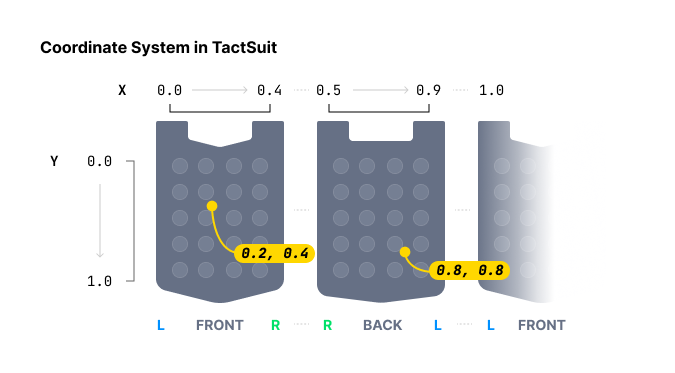
Paramètres
position: Type d'appareil haptique à lire. Reportez-vous à l'enumPositionType.x: Tableau de coordonnées X pour l'effet haptique. Chaque valeur doit être dans la plage : [0.0-1.0]y: Tableau de coordonnées Y pour l'effet haptique. Chaque valeur doit être dans la plage : [0.0-1.0]intensity: Tableau de valeurs d'Intensity pour chaque coordonnée. Chaque valeur doit être un entier et dans la plage : [0-100]duration(optionnel) : Durée du retour haptique en millisecondes. Une valeur supérieure ou égale à100est recommandée.deviceIndex(optionnel) : Index de l'appareil cible lorsque plusieurs appareils du même type de position sont connectés. (Défaut :-1, aucun appareil spécifique)
Valeur de retour
ID de requête identifiant cette demande de lecture. Pour arrêter la lecture, utilisez stopAll.
Exemple
import Tact, { PositionType } from "tact-js";

const HAPTIC_PATHS = [
  {
    x: [0.738, 0.723, 0.709, 0.696, 0.682, 0.667, 0.653],
    y: [0.680, 0.715, 0.749, 0.782, 0.816, 0.852, 0.885],
    intensity: 20
  },
  {
    x: [0.061, 0.072, 0.102, 0.184, 0.254, 0.310, 0.363],
    y: [0.632, 0.587, 0.542, 0.498, 0.411, 0.366, 0.301],
    intensity: 60
  }
];

const TIME_OF_FRAME = 250; // milliseconds

const playPathExample = async () => {
  const frames = HAPTIC_PATHS[0].x.length;

  for (let i = 0; i < frames; i++) {
    await Tact.playPath({
      position: PositionType.Vest, // TactSuit Pro
      x: HAPTIC_PATHS.map(point => point.x[i]),
      y: HAPTIC_PATHS.map(point => point.y[i]),
      intensity: HAPTIC_PATHS.map(point => point.intensity),
      duration: TIME_OF_FRAME
    });
    await new Promise(resolve => setTimeout(resolve, TIME_OF_FRAME));
  }
}
playGlove
playGlove({ position, motors, playtimes, shapes, repeatCount }: PlayGloveParams): Promise<number>;

type PlayGloveParams = {
  position: PositionType;  // GloveL or GloveR
  motors: Int32Array;      // Array of 8 motor intensity values [0 - 100]
  playtimes: Int32Array;   // Array of 8 time interval values
  shapes: Int32Array;      // Array of 8 waveform values
  repeatCount: number;     // Number of times to play the pattern
};
TactGlove uniquement. Lit des effets haptiques dans le TactGlove avec un contrôle précis sur la Duration et les motifs d'Intensity. Cela offre un contrôle plus détaillé que playDot.
Chaque paramètre tableau doit contenir exactement huit éléments, un pour chaque moteur du gant.
Paramètres
-
position: Type d'appareil haptique à lire. Doit utiliserPositionType.GloveLouPositionType.GloveR. -
motors: Tableau de 8 valeurs d'Intensity, une par moteur. Chaque valeur doit être un entier et dans la plage : [0-100]Indice du tableau Le moteur est positionné… 0Bout du pouce 1Bout de l'index 2Bout du majeur 3Bout de l'annulaire 4Bout de l'auriculaire 5Sur le poignet 6Sur la paume (côté pouce) 7Sur la paume (côté auriculaire) -
playtimes: Tableau de 8 valeurs d'intervalle de temps. Les valeurs valides sont :Valeur Duration 15ms 210ms 420ms 630ms 840ms -
shapes: Tableau de 8 valeurs de forme d'onde contrôlant l'évolution de l'Intensity dans le temps :Valeur Motif de forme d'onde 0Intensity constante pendant la Duration 1Commence à l'Intensity spécifiée et diminue de moitié 2Commence à la moitié de l'Intensity et augmente jusqu'au maximum -
repeatCount: Nombre total de fois que le motif à 8 moteurs est lu, y compris la première lecture.
Valeur de retour
ID de requête identifiant cette demande de lecture. Pour arrêter la lecture, utilisez stopAll.
Exemple
import Tact, { PositionType } from "tact-js";

const playGloveExample = async () => {
  const motors = new Int32Array([100, 100, 100, 100, 100, 100, 100, 100]);
  const playtimes = new Int32Array([8, 8, 8, 8, 8, 8, 8, 8]);
  const shapes = new Int32Array([2, 2, 2, 2, 2, 2, 2, 2]);

  const requestId = await Tact.playGlove({
    position: PositionType.GloveR,
    motors,
    playtimes,
    shapes,
    repeatCount: 3
  });

  console.log(`Playback request ID: ${requestId}`);
}
Contrôle de la lecture
pause
pause(eventKey: string): Promise<void>
Met en pause un événement haptique spécifique en cours de lecture.
Paramètres
eventKey: Nom de l'événement haptique à mettre en pause.
Exemple
import Tact from "tact-js";

const playAndPauseExample = async () => {
  await Tact.play({ eventKey: "dash" });
  await new Promise(resolve => setTimeout(resolve, 1000));
  await Tact.pause("dash");
}
resume
resume(eventKey: string): Promise<void>
Reprend un événement haptique précédemment mis en pause.
Paramètres
eventKey: Nom de l'événement haptique à reprendre.
Exemple
import Tact from "tact-js";

const playPauseAndResumeExample = async () => {
  await Tact.play({ eventKey: "dash" });
  await new Promise(resolve => setTimeout(resolve, 1000));
  await Tact.pause("dash");
  await new Promise(resolve => setTimeout(resolve, 1000));
  await Tact.resume("dash");
}
stop
stop(eventKey: string): Promise<void>
Arrête complètement un événement haptique spécifique.
Paramètres
eventKey: Nom de l'événement haptique à arrêter.
Exemple
import Tact from "tact-js";

const stopExample = async () => {
  await Tact.play({ eventKey: "dash" });
  await new Promise(resolve => setTimeout(resolve, 1000));
  await Tact.stop("dash");
}
stopAll
stopAll(): Promise<void>
Arrête tous les effets haptiques en cours de lecture.
Exemple
import Tact from "tact-js";

const stopAllExample = async () => {
  await Tact.play({ eventKey: "dash" });
  await Tact.play({ eventKey: "heartbeat" });
  await Tact.play({ eventKey: "hit" });
  await Tact.play({ eventKey: "slash" });
  await new Promise(resolve => setTimeout(resolve, 500));

  await Tact.stopAll();
}
Cycle de vie
init
init({ appId, apiKey }: InitParams): Promise<boolean>;

type InitParams = {
  appId: string;   // Your bHaptics App ID
  apiKey: string;  // Your bHaptics API Key
};
Initialise le SDK bHaptics. Cette fonction doit être appelée avant d'utiliser toute autre fonction du SDK. Elle initialise le SDK et établit la connexion avec bHaptics Player.
Paramètres
appId: Votre ID d'application bHaptics depuis le bHaptics Developer PortalapiKey: Votre clé API bHaptics depuis le bHaptics Developer Portal
Valeur de retour
Retourne true si l'initialisation réussit, false sinon.
Exemple
import Tact from "tact-js";

const initTact = async () => {
  const result = await Tact.init({
    appId: "your-app-id",
    apiKey: "your-api-key",
  });

  console.log(result ? "Connection Success!" : "Connection Failed...");
}
Vérification du statut
getConnectedDevices
getConnectedDevices(): Promise<any[]>
Obtient la liste de tous les appareils haptiques connectés.
Valeur de retour
Tableau d'objets d'appareils connectés. Retourne un tableau vide ([]) lorsqu'aucun appareil n'est connecté. Chaque objet possède les champs suivants :
| Champ | Type | Description |
|---|---|---|
position | number | Position numérique de l'appareil : 0 Vest, 1 ForearmL, 2 ForearmR, 3 Head, 4 HandL, 5 HandR, 6 FootL, 7 FootR, 8 GloveL, 9 GloveR. Utilisez PositionUtils.positionToType(position) pour le convertir en PositionType. |
deviceName | string | Nom d'affichage de l'appareil (ex. "TactGlove (L)"). |
address | string | Adresse MAC de l'appareil. À utiliser avec ping. |
connected | boolean | Indique si l'appareil est actuellement connecté. |
paired | boolean | Indique si l'appareil est couplé dans bHaptics Player. |
battery | number | Niveau de batterie en pourcentage. |
audioJackIn | boolean | Indique si une prise audio est branchée (appareils à accessoire audio). |
vsm | number | Paramètre de force de vibration configuré dans bHaptics Player. |
Voici un exemple de valeur de retour :
[
    {
        "position": 8,
        "deviceName": "TactGlove (L)",
        "address": "F418EB165E99",
        "connected": true,
        "paired": true,
        "battery": 91,
        "audioJackIn": false,
        "vsm": 20
    },
    {
        "position": 9,
        "deviceName": "TactGlove (R)",
        "address": "DF8B33412EC5",
        "connected": true,
        "paired": true,
        "battery": 84,
        "audioJackIn": false,
        "vsm": 20
    }
]
Exemple
import Tact from "tact-js";

const showDevicesExample = async () => {
  const devices = await Tact.getConnectedDevices();
  console.log("Connected devices:", devices);
}
getHapticMappings
getHapticMappings(): Promise<any[]>
Obtient la liste de tous les événements haptiques enregistrés dans l'application haptique actuelle (déployée depuis le bHaptics Developer Portal).
Valeur de retour
Tableau d'objets de mappage haptique. Chaque objet possède les champs suivants :
| Champ | Type | Description |
|---|---|---|
eventName | string | Clé d'événement. À utiliser avec play et les autres fonctions basées sur les événements. |
eventTime | number | Duration de l'événement en millisecondes. |
Voici un exemple de valeur de retour :
[
    {
        "eventName": "punch-recoil",
        "eventTime": 180
    },
    {
        "eventName": "dash",
        "eventTime": 3260
    },
    {
        "eventName": "teleport",
        "eventTime": 460
    }
]
Exemple
import Tact from "tact-js";

const showMappingsExample = async () => {
  const mappings = await Tact.getHapticMappings();

  for (const mapping of mappings) {
    console.log(`${mapping.eventName}: ${mapping.eventTime}ms`);
  }
}
getEvent
getEvent(eventKey: string): Promise<number>
Obtient la Duration d'un événement haptique enregistré.
Paramètres
eventKey: Nom de l'événement haptique à rechercher.
Valeur de retour
Duration de l'événement en millisecondes. Retourne 0 si la clé d'événement n'est pas enregistrée — vous pouvez utiliser cela pour vérifier si une clé d'événement existe avant d'appeler play.
Exemple
import Tact from "tact-js";

const getEventExample = async () => {
  const duration = await Tact.getEvent("dash");

  if (duration > 0) {
    console.log(`dash is ${duration}ms long`);
  } else {
    console.log("dash is not registered");
  }
}
isDeviceConnected
isDeviceConnected(position: PositionType): Promise<boolean>
Vérifie si un type d'appareil spécifique est connecté.
Paramètres
position: Type d'appareil haptique à vérifier. Reportez-vous à l'enumPositionType.
Valeur de retour
true si le type d'appareil est connecté, false sinon.
Exemple
import Tact, { PositionType } from "tact-js";

const isDeviceConnectedExample = async () => {
  const isGloveConnected = await Tact.isDeviceConnected(PositionType.GloveR);
  console.log("Right TactGlove connected:", isGloveConnected);
}
isConnected
isConnected(): Promise<boolean>
Vérifie le statut de connexion avec bHaptics Player.
Valeur de retour
true si connecté à bHaptics Player, false sinon.
isPlaying
isPlaying(): Promise<boolean>
Vérifie si un retour haptique est actuellement en cours de lecture.
Valeur de retour
true si un effet haptique est en cours de lecture, false sinon.
isPlayingByEventKey
isPlayingByEventKey(eventKey: string): Promise<boolean>
Vérifie si un événement haptique spécifique est actuellement en cours de lecture.
Paramètres
eventKey: Nom de l'événement haptique à vérifier
Valeur de retour
true si l'événement haptique spécifié est en cours de lecture, false sinon.
Contrôle de l'appareil
ping
ping(address: string): Promise<void>
Envoie un signal ping à un appareil spécifique pour tester la connexion.
Paramètres
address: L'adresse MAC de l'appareil haptique. Vous pouvez obtenir l'adresse depuisgetConnectedDevices()
Exemple
import Tact from "tact-js";

const pingFirstDeviceExample = async () => {
  const devices = await Tact.getConnectedDevices();

  if (devices.length > 0) {
    await Tact.ping(devices[0].address);
  }
}
pingAll
pingAll(): Promise<void>
Envoie un signal ping à tous les appareils connectés.
motorTest
motorTest(): Promise<void>
Exécute une séquence de test des moteurs sur le TactSuit Pro (Vest) : chacun des 32 emplacements de moteur se déclenche à pleine Intensity pendant une seconde, l'un après l'autre. La séquence complète prend environ 32 secondes ; la promesse retournée se résout lorsque la séquence se termine.
Notez que ce test couvre uniquement la position Vest — il ne teste pas les autres types d'appareils.
Enums communs
PositionType
enum PositionType {
  Vest = "Vest",
  ForearmL = "ForearmL",
  ForearmR = "ForearmR",
  Head = "Head",
  HandL = "HandL",
  HandR = "HandR",
  FootL = "FootL",
  FootR = "FootR",
  GloveL = "GloveL",
  GloveR = "GloveR"
}
Enums de chaînes de caractères. Utilisez-les pour déterminer le type d'appareil haptique.
| Valeur | Appareil | Nombre de moteurs |
|---|---|---|
Vest | TactSuit Pro | 32 |
ForearmL | TactSleeve(Left) | 3 |
ForearmR | TactSleeve(Right) | 3 |
Head | TactVisor | 4 |
HandL | Tactosy for Hands(Left) | 3 |
HandR | Tactosy for Hands(Right) | 3 |
FootL | Tactosy for Feet(Left) | 3 |
FootR | Tactosy for Feet(Right) | 3 |
GloveL | TactGlove(Left) | 8 |
GloveR | TactGlove(Right) | 8 |
tact-js exporte également une classe PositionUtils avec des assistants statiques pour convertir entre les positions numériques utilisées par getConnectedDevices et l'enum PositionType :
import { PositionType, PositionUtils } from "tact-js";

PositionUtils.positionToType(9);                  // PositionType.GloveR
PositionUtils.enumToPosition(PositionType.Vest);  // 0