레퍼런스
tact-js 패키지는 JavaScript에서 bHaptics 햅틱 디바이스를 제어하는 함수를 제공합니다. 햅틱 패턴 재생, 디바이스 모터의 직접 제어, 햅틱 재생 관리를 할 수 있습니다.
import Tact from "tact-js";
이벤트 기반 햅틱 재생
특정 이벤트에 바인딩된 햅틱 패턴(bHaptics Designer/Portal에서 디자인)을 재생합니다. 대부분의 애플리케이션에 권장되는 함수입니다.
play
play({ eventKey, startTime, intensityRatio, durationRatio, offsetX, offsetY, deviceIndex }: PlayParams): Promise<void>;

type PlayParams = {
  eventKey: string;         // Name of the haptic event
  startTime?: number;       // Playback start position in milliseconds
  intensityRatio?: number;  // Intensity multiplier [0.0 - 2.0]
  durationRatio?: number;   // Duration multiplier
  offsetX?: number;         // Rotation offset [0.0 - 360.0]
  offsetY?: number;         // Vertical offset [-0.5 - 0.5]
  deviceIndex?: number;     // Target device index
};
미리 정의된 햅틱 이벤트를 재생합니다.
매개변수
eventKey: 햅틱 이벤트의 이름.startTime(선택): 재생 시작 위치(밀리초 단위) — 이벤트의 처음startTime밀리초는 건너뜁니다. 예를 들어 3,260ms 길이의 이벤트를startTime: 2000으로 재생하면 마지막 1,260ms만 재생됩니다. (기본값:0)intensityRatio(선택): 햅틱 Intensity 배율. 유효 범위: [0.0-2.0] (기본값:1.0)durationRatio(선택): Duration 배율. (기본값:1.0)offsetX(선택): 햅틱을 반시계 방향으로 회전합니다. 유효 범위: [0.0-360.0] (기본값:0.0)offsetY(선택): 햅틱을 위 또는 아래로 이동합니다. 유효 범위: [-0.5-0.5] (기본값:0.0)deviceIndex(선택): 같은 포지션 타입의 디바이스가 여러 개 연결되어 있을 때 대상으로 할 디바이스의 인덱스. (기본값:-1, 특정 디바이스 지정 안 함)
반환값
요청이 bHaptics Player로 전송되면 프로미스는 값 없이(undefined) 이행됩니다.
이벤트 키가 등록되어 있지 않은 경우에도 정상적으로 이행된다는 점에 유의하세요 — 이 경우 아무것도 재생되지 않으며 오류도 발생하지 않습니다. 이벤트 키의 존재 여부는 getEvent로 확인하세요.
예제
import Tact from "tact-js";

const playExample = async () => {
  await Tact.play({ eventKey: "heartbeat" });
};

const playMoreExample = async () => {
  await Tact.play({
    eventKey: "hit",
    startTime: 0,
    intensityRatio: 1.0,
    durationRatio: 1.0,
    offsetX: 180.0,
    offsetY: 0.25,
  });
};
playLoop
playLoop({ eventKey, intensityRatio, durationRatio, interval, maxCount, offsetX, offsetY, deviceIndex }: PlayLoopParams): Promise<number>;

type PlayLoopParams = {
  eventKey: string;        // Name of the haptic event
  intensityRatio?: number; // Intensity multiplier [0.0 - 2.0]
  durationRatio?: number;  // Duration multiplier
  interval: number;        // Pause between repetitions (milliseconds)
  maxCount: number;        // Total number of plays
  offsetX: number;         // Rotation offset [0.0 - 360.0]
  offsetY: number;         // Vertical offset [-0.5 - 0.5]
  deviceIndex?: number;    // Target device index
};
햅틱 이벤트를 지정한 횟수만큼 반복 재생합니다.
매개변수
eventKey: 햅틱 이벤트의 이름.intensityRatio(선택): 햅틱 Intensity 배율. 유효 범위: [0.0-2.0] (기본값:1.0)durationRatio(선택): Duration 배율. (기본값:1.0)interval: 반복 사이의 일시 정지 시간(밀리초). 한 재생의 끝에서 다음 재생의 시작까지를 기준으로 측정됩니다. 예를 들어 460ms 길이의 이벤트를interval: 500,maxCount: 3으로 재생하면 약 2,380ms(460 + 500 + 460 + 500 + 460) 후에 끝납니다.maxCount: 햅틱 이벤트를 재생할 총 횟수(첫 번째 재생 포함).1미만의 값은1로 동작합니다.offsetX: 햅틱을 반시계 방향으로 회전합니다. 유효 범위: [0.0-360.0] (기본값:0.0)offsetY: 햅틱을 위 또는 아래로 이동합니다. 유효 범위: [-0.5-0.5] (기본값:0.0)deviceIndex(선택): 같은 포지션 타입의 디바이스가 여러 개 연결되어 있을 때 대상으로 할 디바이스의 인덱스. (기본값:-1, 특정 디바이스 지정 안 함)
반환값
이 재생 요청을 식별하는 요청 ID.
이벤트 키가 등록되어 있지 않은 경우에도 요청 ID가 반환된다는 점에 유의하세요 — 이 경우 아무것도 재생되지 않습니다. 반복 재생 중인 이벤트를 중지하려면 이벤트 키로 stop을 호출하거나 stopAll을 사용하세요.
반복 재생이 진행되는 동안 isPlayingByEventKey는 반복 사이의 interval 일시 정지 구간을 포함한 전체 구간에서 true를 반환합니다.
예제
import Tact from "tact-js";

const playLoopExample = async () => {
  const requestId = await Tact.playLoop({
    eventKey: "hit",
    intensityRatio: 1.0,
    durationRatio: 1.0,
    interval: 1000,
    maxCount: 5,
    offsetX: 0.0,
    offsetY: 0.0,
  });

  console.log(`Playback request ID: ${requestId}`);
};
햅틱 직접 재생
이벤트 없이 햅틱을 재생하려면 이 함수들을 사용하세요.
playDot
playDot({ position, motorValues, duration, deviceIndex }: PlayDotParams): Promise<number>;

type PlayDotParams = {
  position: PositionType;  // Device position type
  motorValues: number[];   // Array of motor intensity values [0 - 100]
  duration?: number;       // Duration in milliseconds
  deviceIndex?: number;    // Target device index
};
특정 햅틱 액추에이터에서 햅틱 피드백을 재생합니다.
매개변수
position: 재생할 햅틱 디바이스의 타입.PositionTypeenum을 참고하세요.motorValues: 각 모터의 Intensity 값 배열. 배열의 길이는 디바이스의 모터 수와 일치해야 합니다. 각 값은 정수이며 범위 내에 있어야 합니다. 유효 범위: [0-100].duration(선택): 햅틱 피드백의 Duration(밀리초 단위).100이상을 권장합니다.deviceIndex(선택): 같은 포지션 타입의 디바이스가 여러 개 연결되어 있을 때 대상으로 할 디바이스의 인덱스. (기본값:-1, 특정 디바이스 지정 안 함)
반환값
이 재생 요청을 식별하는 요청 ID. 재생을 중지하려면 stopAll을 사용하세요.
매개변수는 클라이언트 측에서 검증되지 않는다는 점에 유의하세요 — 예를 들어 motorValues의 길이가 잘못되었거나 범위를 벗어난 값이 포함된 경우에도 요청 ID가 반환되며, 이 경우 햅틱이 재생되지 않을 수 있습니다.
예제
import Tact, { PositionType } from "tact-js";

const playDotExample = async () => {
  const requestId = await Tact.playDot({
    position: PositionType.ForearmL,  // Left TactSleeve
    motorValues: [100, 80, 60],       // TactSleeve has 3 motors
    duration: 100
  });

  console.log(`Playback request ID: ${requestId}`);
}
playPath
playPath({ position, x, y, intensity, duration, deviceIndex }: PlayPathParams): Promise<number>;

type PlayPathParams = {
  position: PositionType;  // Device position type
  x: number[];             // Array of x coordinates [0.0 - 1.0]
  y: number[];             // Array of y coordinates [0.0 - 1.0]
  intensity: number[];     // Array of intensity values [0 - 100]
  duration?: number;       // Duration in milliseconds
  deviceIndex?: number;    // Target device index
};
지정한 좌표를 따라 햅틱 피드백을 재생합니다. 개별 모터를 제어하는 playDot과 달리, 이 메서드는 디바이스의 특정 좌표에 대한 햅틱 Intensity를 지정합니다.
햅틱 위치를 지정할 때 playDot은 이산적인 제어를 제공하는 반면, playPath는 더 연속적입니다. playDot은 개별 액추에이터에 Intensity를 할당하는 반면, playPath는 특정 좌표(X축과 Y축 모두 0과 1 사이)에 대한 Intensity 지정이 가능하며, 주변 액추에이터가 그에 따라 진동합니다.
여러 좌표와 여러 Intensity를 함께 지정할 수 있습니다. 리스트에 있는 이 좌표들 주변의 모든 액추에이터는 순차적이 아니라 동시에 작동한다는 점에 유의하세요. 모든 배열(x, y, intensity)의 크기는 같아야 합니다.
x, y, intensity 배열의 길이가 서로 다르면 SDK 내부의 WebAssembly 모듈이 복구 불가능한 오류로 크래시됩니다(tact-js 2.0.4에서 확인됨) — 페이지를 새로 고침할 때까지 햅틱이 동작하지 않습니다. 호출하기 전에 세 배열의 길이가 같은지 반드시 확인하세요.
값을 점진적으로 변경하면서 이 함수를 계속 호출하면 햅틱 포인트가 이동하는 효과를 구현할 수 있습니다.
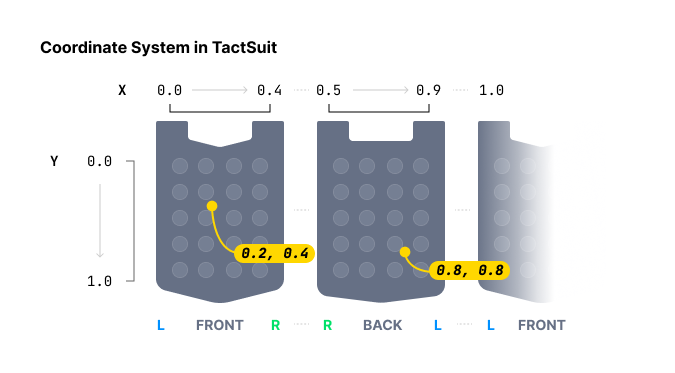
매개변수
position: 재생할 햅틱 디바이스의 타입.PositionTypeenum을 참고하세요.x: 햅틱 이펙트의 X 좌표 배열. 각 값의 범위: [0.0-1.0]y: 햅틱 이펙트의 Y 좌표 배열. 각 값의 범위: [0.0-1.0]intensity: 각 좌표에 대한 Intensity 값 배열. 각 값은 정수이며 범위 내에 있어야 합니다: [0-100]duration(선택): 햅틱 피드백의 Duration(밀리초 단위).100이상을 권장합니다.deviceIndex(선택): 같은 포지션 타입의 디바이스가 여러 개 연결되어 있을 때 대상으로 할 디바이스의 인덱스. (기본값:-1, 특정 디바이스 지정 안 함)
반환값
이 재생 요청을 식별하는 요청 ID. 재생을 중지하려면 stopAll을 사용하세요.
예제
import Tact, { PositionType } from "tact-js";

const HAPTIC_PATHS = [
  {
    x: [0.738, 0.723, 0.709, 0.696, 0.682, 0.667, 0.653],
    y: [0.680, 0.715, 0.749, 0.782, 0.816, 0.852, 0.885],
    intensity: 20
  },
  {
    x: [0.061, 0.072, 0.102, 0.184, 0.254, 0.310, 0.363],
    y: [0.632, 0.587, 0.542, 0.498, 0.411, 0.366, 0.301],
    intensity: 60
  }
];

const TIME_OF_FRAME = 250; // milliseconds

const playPathExample = async () => {
  const frames = HAPTIC_PATHS[0].x.length;

  for (let i = 0; i < frames; i++) {
    await Tact.playPath({
      position: PositionType.Vest, // TactSuit Pro
      x: HAPTIC_PATHS.map(point => point.x[i]),
      y: HAPTIC_PATHS.map(point => point.y[i]),
      intensity: HAPTIC_PATHS.map(point => point.intensity),
      duration: TIME_OF_FRAME
    });
    await new Promise(resolve => setTimeout(resolve, TIME_OF_FRAME));
  }
}
playGlove
playGlove({ position, motors, playtimes, shapes, repeatCount }: PlayGloveParams): Promise<number>;

type PlayGloveParams = {
  position: PositionType;  // GloveL or GloveR
  motors: Int32Array;      // Array of 8 motor intensity values [0 - 100]
  playtimes: Int32Array;   // Array of 8 time interval values
  shapes: Int32Array;      // Array of 8 waveform values
  repeatCount: number;     // Number of times to play the pattern
};
TactGlove 전용. Duration과 Intensity 패턴을 세밀하게 제어하면서 TactGlove에서 햅틱을 재생합니다. playDot보다 더 디테일한 제어가 가능합니다.
각 배열 매개변수는 글러브의 각 모터에 대응하는 정확히 8개의 요소를 가져야 합니다.
매개변수
-
position: 재생할 햅틱 디바이스의 타입. 반드시PositionType.GloveL또는PositionType.GloveR을 사용해야 합니다. -
motors: 각 모터의 Intensity를 나타내는 8개의 값으로 구성된 배열. 각 값은 정수이며 범위 내에 있어야 합니다: [0-100]배열 인덱스 모터 위치 0엄지 끝 1검지 끝 2중지 끝 3약지 끝 4새끼손가락 끝 5손목 6손바닥 (엄지 쪽) 7손바닥 (새끼손가락 쪽) -
playtimes: 8개의 작동 시간 간격 값으로 구성된 배열. 유효한 값은 다음과 같습니다:값 Duration 15ms 210ms 420ms 630ms 840ms -
shapes: 시간에 따른 Intensity 변화를 제어하는 8개의 파형 값으로 구성된 배열:값 파형 패턴 0Duration 동안 일정한 Intensity 1지정한 Intensity에서 시작하여 절반으로 감소 2절반의 Intensity에서 시작하여 최대 Intensity까지 증가 -
repeatCount: 8개 모터 패턴을 재생할 총 횟수(첫 번째 재생 포함).
반환값
이 재생 요청을 식별하는 요청 ID. 재생을 중지하려면 stopAll을 사용하세요.
예제
import Tact, { PositionType } from "tact-js";

const playGloveExample = async () => {
  const motors = new Int32Array([100, 100, 100, 100, 100, 100, 100, 100]);
  const playtimes = new Int32Array([8, 8, 8, 8, 8, 8, 8, 8]);
  const shapes = new Int32Array([2, 2, 2, 2, 2, 2, 2, 2]);

  const requestId = await Tact.playGlove({
    position: PositionType.GloveR,
    motors,
    playtimes,
    shapes,
    repeatCount: 3
  });

  console.log(`Playback request ID: ${requestId}`);
}
재생 제어
pause
pause(eventKey: string): Promise<void>
현재 재생 중인 특정 햅틱 이벤트를 일시 정지합니다.
매개변수
eventKey: 일시 정지할 햅틱 이벤트의 이름.
예제
import Tact from "tact-js";

const playAndPauseExample = async () => {
  await Tact.play({ eventKey: "dash" });
  await new Promise(resolve => setTimeout(resolve, 1000));
  await Tact.pause("dash");
}
resume
resume(eventKey: string): Promise<void>
이전에 일시 정지된 햅틱 이벤트를 다시 재생합니다.
매개변수
eventKey: 다시 재생할 햅틱 이벤트의 이름.
예제
import Tact from "tact-js";

const playPauseAndResumeExample = async () => {
  await Tact.play({ eventKey: "dash" });
  await new Promise(resolve => setTimeout(resolve, 1000));
  await Tact.pause("dash");
  await new Promise(resolve => setTimeout(resolve, 1000));
  await Tact.resume("dash");
}
stop
stop(eventKey: string): Promise<void>
특정 햅틱 이벤트를 완전히 중지합니다.
매개변수
eventKey: 중지할 햅틱 이벤트의 이름.
예제
import Tact from "tact-js";

const stopExample = async () => {
  await Tact.play({ eventKey: "dash" });
  await new Promise(resolve => setTimeout(resolve, 1000));
  await Tact.stop("dash");
}
stopAll
stopAll(): Promise<void>
현재 재생 중인 모든 햅틱을 중지합니다.
예제
import Tact from "tact-js";

const stopAllExample = async () => {
  await Tact.play({ eventKey: "dash" });
  await Tact.play({ eventKey: "heartbeat" });
  await Tact.play({ eventKey: "hit" });
  await Tact.play({ eventKey: "slash" });
  await new Promise(resolve => setTimeout(resolve, 500));

  await Tact.stopAll();
}
라이프사이클
init
init({ appId, apiKey }: InitParams): Promise<boolean>;

type InitParams = {
  appId: string;   // Your bHaptics App ID
  apiKey: string;  // Your bHaptics API Key
};
bHaptics SDK를 초기화합니다. 이 함수는 SDK의 다른 함수를 사용하기 전에 반드시 호출해야 합니다. SDK를 초기화하고 bHaptics Player와의 연결을 설정합니다.
매개변수
appId: bHaptics Developer Portal에서 발급받은 bHaptics 애플리케이션 IDapiKey: bHaptics Developer Portal에서 발급받은 bHaptics API 키
반환값
초기화에 성공하면 true, 그렇지 않으면 false를 반환합니다.
예제
import Tact from "tact-js";

const initTact = async () => {
  const result = await Tact.init({
    appId: "your-app-id",
    apiKey: "your-api-key",
  });

  console.log(result ? "Connection Success!" : "Connection Failed...");
}
상태 확인
getConnectedDevices
getConnectedDevices(): Promise<any[]>
연결된 모든 햅틱 디바이스의 목록을 가져옵니다.
반환값
연결된 디바이스 객체의 배열. 연결된 디바이스가 없으면 빈 배열([])을 반환합니다. 각 객체는 다음 필드를 가집니다:
| 필드 | 타입 | 설명 |
|---|---|---|
position | number | 디바이스의 숫자 포지션: 0 Vest, 1 ForearmL, 2 ForearmR, 3 Head, 4 HandL, 5 HandR, 6 FootL, 7 FootR, 8 GloveL, 9 GloveR. PositionUtils.positionToType(position)을 사용하면 PositionType으로 변환할 수 있습니다. |
deviceName | string | 디바이스의 표시 이름(예: "TactGlove (L)"). |
address | string | 디바이스의 MAC 주소. ping과 함께 사용합니다. |
connected | boolean | 디바이스가 현재 연결되어 있는지 여부. |
paired | boolean | 디바이스가 bHaptics Player에 페어링되어 있는지 여부. |
battery | number | 배터리 잔량(퍼센트). |
audioJackIn | boolean | 오디오 잭이 꽂혀 있는지 여부(오디오 액세서리 디바이스). |
vsm | number | bHaptics Player에서 설정한 진동 강도 값. |
반환값의 예는 다음과 같습니다:
[
    {
        "position": 8,
        "deviceName": "TactGlove (L)",
        "address": "F418EB165E99",
        "connected": true,
        "paired": true,
        "battery": 91,
        "audioJackIn": false,
        "vsm": 20
    },
    {
        "position": 9,
        "deviceName": "TactGlove (R)",
        "address": "DF8B33412EC5",
        "connected": true,
        "paired": true,
        "battery": 84,
        "audioJackIn": false,
        "vsm": 20
    }
]
예제
import Tact from "tact-js";

const showDevicesExample = async () => {
  const devices = await Tact.getConnectedDevices();
  console.log("Connected devices:", devices);
}
getHapticMappings
getHapticMappings(): Promise<any[]>
현재 햅틱 애플리케이션에 등록된 모든 햅틱 이벤트(bHaptics Developer Portal에서 배포)의 목록을 가져옵니다.
반환값
햅틱 매핑 객체의 배열. 각 객체는 다음 필드를 가집니다:
| 필드 | 타입 | 설명 |
|---|---|---|
eventName | string | 이벤트 키. play 및 기타 이벤트 기반 함수와 함께 사용합니다. |
eventTime | number | 이벤트의 Duration(밀리초 단위). |
반환값의 예는 다음과 같습니다:
[
    {
        "eventName": "punch-recoil",
        "eventTime": 180
    },
    {
        "eventName": "dash",
        "eventTime": 3260
    },
    {
        "eventName": "teleport",
        "eventTime": 460
    }
]
예제
import Tact from "tact-js";

const showMappingsExample = async () => {
  const mappings = await Tact.getHapticMappings();

  for (const mapping of mappings) {
    console.log(`${mapping.eventName}: ${mapping.eventTime}ms`);
  }
}
getEvent
getEvent(eventKey: string): Promise<number>
등록된 햅틱 이벤트의 Duration을 가져옵니다.
매개변수
eventKey: 조회할 햅틱 이벤트의 이름.
반환값
이벤트의 Duration(밀리초 단위). 이벤트 키가 등록되어 있지 않으면 0을 반환합니다 — play를 호출하기 전에 이벤트 키의 존재 여부를 확인하는 데 사용할 수 있습니다.
예제
import Tact from "tact-js";

const getEventExample = async () => {
  const duration = await Tact.getEvent("dash");

  if (duration > 0) {
    console.log(`dash is ${duration}ms long`);
  } else {
    console.log("dash is not registered");
  }
}
isDeviceConnected
isDeviceConnected(position: PositionType): Promise<boolean>
특정 디바이스 타입의 연결 여부를 확인합니다.
매개변수
position: 재생할 햅틱 디바이스의 타입.PositionTypeenum을 참고하세요.
반환값
해당 디바이스 타입이 연결되어 있으면 true, 그렇지 않으면 false.
예제
import Tact, { PositionType } from "tact-js";

const isDeviceConnectedExample = async () => {
  const isGloveConnected = await Tact.isDeviceConnected(PositionType.GloveR);
  console.log("Right TactGlove connected:", isGloveConnected);
}
isConnected
isConnected(): Promise<boolean>
bHaptics Player와의 연결 상태를 확인합니다.
반환값
bHaptics Player에 연결되어 있으면 true, 그렇지 않으면 false.
isPlaying
isPlaying(): Promise<boolean>
현재 재생 중인 햅틱 피드백이 있는지 확인합니다.
반환값
재생 중인 햅틱이 있으면 true, 그렇지 않으면 false.
isPlayingByEventKey
isPlayingByEventKey(eventKey: string): Promise<boolean>
특정 햅틱 이벤트가 현재 재생 중인지 확인합니다.
매개변수
eventKey: 확인할 햅틱 이벤트의 이름
반환값
지정한 햅틱 이벤트가 재생 중이면 true, 그렇지 않으면 false.
디바이스 제어
ping
ping(address: string): Promise<void>
연결을 테스트하기 위해 특정 디바이스에 핑 신호를 보냅니다.
매개변수
address: 햅틱 디바이스의 MAC 주소.getConnectedDevices()를 사용하여 주소를 얻을 수 있습니다
예제
import Tact from "tact-js";

const pingFirstDeviceExample = async () => {
  const devices = await Tact.getConnectedDevices();

  if (devices.length > 0) {
    await Tact.ping(devices[0].address);
  }
}
pingAll
pingAll(): Promise<void>
연결된 모든 디바이스에 핑 신호를 보냅니다.
motorTest
motorTest(): Promise<void>
TactSuit Pro(Vest)에서 모터 테스트 시퀀스를 실행합니다. 32개의 모터 위치 각각이 차례로 1초씩 최대 Intensity로 작동합니다. 전체 시퀀스는 약 32초가 걸리며, 반환된 프로미스는 시퀀스가 끝나면 이행됩니다.
이 테스트는 Vest 포지션만 대상으로 하며, 다른 디바이스 타입은 테스트하지 않는다는 점에 유의하세요.
공통 Enum
PositionType
enum PositionType {
  Vest = "Vest",
  ForearmL = "ForearmL",
  ForearmR = "ForearmR",
  Head = "Head",
  HandL = "HandL",
  HandR = "HandR",
  FootL = "FootL",
  FootR = "FootR",
  GloveL = "GloveL",
  GloveR = "GloveR"
}
문자열 enum입니다. 햅틱 디바이스의 타입을 지정하는 데 사용합니다.
| 값 | 디바이스 | 모터 수 |
|---|---|---|
Vest | TactSuit Pro | 32 |
ForearmL | TactSleeve(Left) | 3 |
ForearmR | TactSleeve(Right) | 3 |
Head | TactVisor | 4 |
HandL | Tactosy for Hands(Left) | 3 |
HandR | Tactosy for Hands(Right) | 3 |
FootL | Tactosy for Feet(Left) | 3 |
FootR | Tactosy for Feet(Right) | 3 |
GloveL | TactGlove(Left) | 8 |
GloveR | TactGlove(Right) | 8 |
tact-js는 getConnectedDevices가 사용하는 숫자 포지션과 PositionType enum 간의 변환을 위한 정적 헬퍼를 제공하는 PositionUtils 클래스도 내보냅니다:
import { PositionType, PositionUtils } from "tact-js";

PositionUtils.positionToType(9);                  // PositionType.GloveR
PositionUtils.enumToPosition(PositionType.Vest);  // 0