레퍼런스
bhaptics_python 모듈은 Python에서 bHaptics 햅틱 디바이스를 제어하는 함수를 제공합니다. 햅틱 패턴 재생, 디바이스 모터의 직접 제어, 햅틱 재생 관리를 할 수 있습니다.
import bhaptics_python
이벤트 기반 햅틱 재생
특정 이벤트에 바인딩된 햅틱 패턴(bHaptics Designer/Portal에서 디자인)을 재생합니다. 대부분의 애플리케이션에 권장되는 함수입니다.
play_event
async def bhaptics_python.play_event(event_name: str) -> int
async def bhaptics_python.play_event(event_name: str, device_index: int) -> int
미리 정의된 햅틱 이벤트를 재생합니다.
- 이벤트 재생은 디바이스 인덱스가 기본값(
-1)인 햅틱 디바이스에 적용됩니다. 첫 번째 매개변수—이벤트 이름—만 사용하면 됩니다. 일반적인 용도로 사용할 수 있습니다. - 특정 햅틱 디바이스를 작동시키고 싶다면 두 번째 매개변수—디바이스 인덱스—도 사용할 수 있습니다. 디바이스 인덱스는 bHaptics Player에서 확인하거나 설정할 수 있습니다.
매개변수
event_name: 햅틱 이벤트의 이름.device_index(선택): 햅틱 디바이스의 디바이스 인덱스.
반환값
요청 ID. 재생을 중지하는 데 사용할 수 있습니다. 실패 시 -1을 반환합니다.
예제
import bhaptics_python

async def play_example():
    request_id = await bhaptics_python.play_event("heartbeat")
    print(f"Playback request ID: {request_id}")
play_param
async def bhaptics_python.play_param(
    event_name: str,
    intensity: float,
    duration: float,
    x_offset: float,
    y_offset: float
) -> int
async def bhaptics_python.play_param(
    event_name: str,
    intensity: float,
    duration: float,
    x_offset: float,
    y_offset: float,
    device_index: int
) -> int
햅틱의 강도, Duration, 방향을 조정하여 햅틱 이벤트를 재생합니다.
매개변수
event_name: 햅틱 이벤트의 이름.intensity: 햅틱 Intensity 배율. 유효 범위: [0.0-2.0] (기본값:1.0)duration: Duration 배율. (기본값:1.0)x_offset: 햅틱을 반시계 방향으로 회전합니다. 유효 범위: [0.0-360.0] (기본값:0.0)y_offset: 햅틱을 위 또는 아래로 이동합니다. 유효 범위: [-0.5-0.5] (기본값:0.0)device_index(선택): 햅틱 디바이스의 디바이스 인덱스.
반환값
요청 ID. 재생을 중지하는 데 사용할 수 있습니다. 실패 시 -1을 반환합니다.
예제
import bhaptics_python

async def play_params_example():
    request_id = await bhaptics_python.play_param(
        "pistol_r", 1.0, 1.0, 0.0, 0.0, 0
    )
play_loop
async def play_loop(
    event_name: str,
    intensity: float,
    duration: float,
    x_offset: float,
    y_offset: float,
    interval: int,
    max_count: int
) -> int
async def play_loop(
    event_name: str,
    intensity: float,
    duration: float,
    x_offset: float,
    y_offset: float,
    interval: int,
    max_count: int,
    device_index: int
) -> int
햅틱 이벤트를 반복 재생합니다.
매개변수
event_name: 햅틱 이벤트의 이름.intensity: 햅틱 Intensity 배율. 유효 범위: [0.0-2.0] (기본값:1.0)duration: Duration 배율. (기본값:1.0)x_offset: 햅틱을 반시계 방향으로 회전합니다. 유효 범위: [0.0-360.0] (기본값:0.0)y_offset: 햅틱을 위 또는 아래로 이동합니다. 유효 범위: [-0.5-0.5] (기본값:0.0)interval: 반복 사이의 시간 간격(밀리초).max_count: 반복 횟수.device_index(선택): 햅틱 디바이스의 디바이스 인덱스.
반환값
요청 ID. 재생을 중지하는 데 사용할 수 있습니다. 실패 시 -1을 반환합니다.
예제
import bhaptics_python

async def play_loop_example():
    result = await bhaptics_python.play_loop(
        "heartbeat", 0.8, 1000, 90, 0, 150, 5
    )
play_without_result
async def bhaptics_python.play_without_result(
    event_name: str,
    intensity: float,
    duration: float,
    x_offset: float,
    y_offset: float
)
async def bhaptics_python.play_without_result(
    event_name: str,
    intensity: float,
    duration: float,
    x_offset: float,
    y_offset: float,
    device_index: int
)
결과를 기다리지 않고 햅틱 이벤트를 재생합니다(fire-and-forget).
매개변수
event_name: 햅틱 이벤트의 이름.intensity: 햅틱 Intensity 배율. 유효 범위: [0.0-2.0] (기본값:1.0)duration: Duration 배율. (기본값:1.0)x_offset: 햅틱을 반시계 방향으로 회전합니다. 유효 범위: [0.0-360.0] (기본값:0.0)y_offset: 햅틱을 위 또는 아래로 이동합니다. 유효 범위: [-0.5-0.5] (기본값:0.0)device_index(선택): 햅틱 디바이스의 디바이스 인덱스.
예제
import bhaptics_python

async def play_without_result_example():
    await bhaptics_python.play_without_result(
        "heartbeat", 0.8, 1.0, 90, 0.25
    )
햅틱 직접 재생
이벤트 없이 햅틱을 재생하려면 이 함수들을 사용하세요.
play_dot
async def bhaptics_python.play_dot(
    position: int,
    duration_millis: int,
    values: list[int]
) -> int
async def bhaptics_python.play_dot(
    position: int,
    duration_millis: int,
    values: list[int],
    device_index: int
) -> int
특정 햅틱 액추에이터에서 햅틱 피드백을 재생합니다.
매개변수
position: 재생할 햅틱 디바이스의 타입.값 디바이스 0TactSuit Pro 1TactSleeve(Left) 2TactSleeve(Right) 3TactVisor 4Tactosy for Hands(Left) 5Tactosy for Hands(Right) 6Tactosy for Feet(Left) 7Tactosy for Feet(Right) 8TactGlove(Left) 9TactGlove(Right) duration_millis: 햅틱의 Duration(밀리초 단위).100이상을 권장합니다.values: 리스트의 길이를 디바이스의 모터 수에 맞게 지정합니다. 리스트의 값은 모터의 Intensity를 의미합니다. 리스트의 각 값에 대한 유효 범위: [0-100]device_index(선택): 햅틱 디바이스의 디바이스 인덱스.
예제
import bhaptics_python

async def play_dot_example():
    # Sequentially activate 32 motors
    motor_len = 32
    values = [0 for _ in range(motor_len)]

    for i in range(motor_len):
        values[i] = 50
        if i > 0:
            values[i - 1] = 0

        request_id = await bhaptics_python.play_dot(0, 500, values)
        time.sleep(0.5)
play_path
async def bhaptics_python.play_path(
    position: int,
    duration_millis: int,
    x: list[float],
    y: list[float],
    intensity: list[int]
) -> int
async def bhaptics_python.play_path(
    position: int,
    duration_millis: int,
    x: list[float],
    y: list[float],
    intensity: list[int],
    device_index: int
) -> int
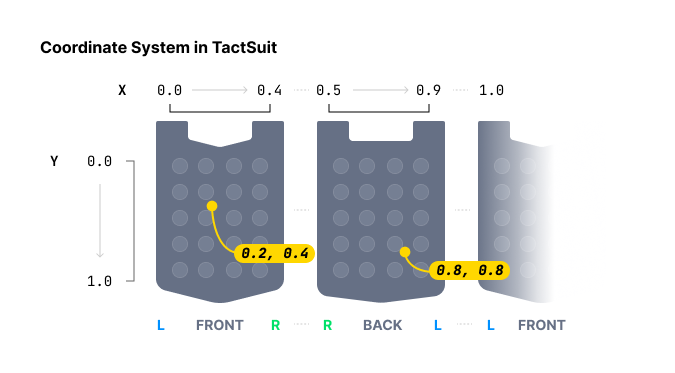
특정 좌표 주변에서 햅틱을 재생합니다. 각 햅틱 액추에이터의 햅틱 Intensity를 개별적으로 지정하는 play_dot 함수와 달리, 이 메서드는 특정 좌표에 대한 햅틱 Intensity를 지정합니다.
햅틱 위치를 지정할 때 play_dot은 이산적인 제어를 제공하는 반면, play_path는 더 연속적입니다. play_dot은 개별 액추에이터에 Intensity를 할당하는 반면, play_path는 특정 좌표(X축과 Y축 모두 0과 1 사이)에 대한 Intensity 지정이 가능하며, 주변 액추에이터가 그에 따라 진동합니다.
여러 좌표와 여러 Intensity를 함께 지정할 수 있습니다. 리스트에 있는 이 좌표들 주변의 모든 액추에이터는 순차적이 아니라 동시에(같은 시간에) 작동한다는 점에 유의하세요. 또한 모든 리스트의 크기는 같아야 합니다.
값을 점진적으로 변경하면서 이 함수를 계속 호출하면 햅틱 포인트가 이동하는 효과를 구현할 수 있습니다.
매개변수
position: 재생할 햅틱 디바이스의 타입. 자세한 내용은 여기를 참고하세요.값 디바이스 모터 수 0TactSuit Pro 32 1TactSleeve(Left) 3 2TactSleeve(Right) 3 3TactVisor 4 4Tactosy for Hands(Left) 3 5Tactosy for Hands(Right) 3 6Tactosy for Feet(Left) 3 7Tactosy for Feet(Right) 3 8TactGlove(Left) 8 9TactGlove(Right) 8 duration_millis: 햅틱의 Duration(밀리초 단위).100이상을 권장합니다.x: 햅틱 이펙트의 X 좌표 리스트. 각 값의 범위: [0.0-1.0]y: 햅틱 이펙트의 Y 좌표 리스트. 각 값의 범위: [0.0-1.0]intensity: 각 좌표에 대한 Intensity 값 리스트. 길이는 좌표의 수와 일치해야 합니다. 각 값의 범위: [0-100]device_index(선택): 햅틱 디바이스의 디바이스 인덱스.
예제
import bhaptics_python
import time

async def play_path_example():
    # Path of point #1
    x1 = [0.738, 0.723, 0.709, 0.696, 0.682, 0.667, 0.653]
    y1 = [0.680, 0.715, 0.749, 0.782, 0.816, 0.852, 0.885]
    intensity1 = [20] * len(x1)
    # Path of point #2
    x2 = [0.061, 0.072, 0.102, 0.184, 0.254, 0.310, 0.363]
    y2 = [0.632, 0.587, 0.542, 0.498, 0.411, 0.366, 0.301]
    intensity2 = [60] * len(x2)

    for i in range(len(x1)):
        # Point #1 and #2 will vibrate at the same time.
        await bhaptics_python.play_path(0, 250, [x1[i], x2[i]], [y1[i], y2[i]], [intensity1[i], intensity2[i]])
        time.sleep(0.25)
play_glove
async def bhaptics_python.play_glove(
    position: int,
    motors: list[int],
    playtimes: list[int],
    shapes: list[int],
    repeat_count: int
) -> int
TactGlove 전용. TactGlove에서 햅틱을 재생합니다. play_dot을 사용할 때와 달리 햅틱 Duration과 진동 Intensity 변화를 세밀하게 조정할 수 있습니다. 이를 통해 햅틱 피드백을 더욱 디테일하게 표현할 수 있습니다.
각 리스트는 8개의 요소를 가져야 하며, 동작하려면 최소 하나의 요소가 필요합니다.
매개변수
-
position: 재생할 햅틱 디바이스의 타입.8또는9만 사용하세요.값 디바이스 8TactGlove(Left) 9TactGlove(Right) -
motors: 각 모터의 Intensity를 나타내는 8개의 요소로 구성된 리스트. 하나의 TactGlove에는 8개의 모터가 있으므로 리스트의 길이는 8이어야 합니다. 리스트의 각 값에 대한 유효 범위: [0-100]리스트 인덱스 모터 위치 0엄지 끝 1검지 끝 2중지 끝 3약지 끝 4새끼손가락 끝 5손목 6손바닥 (엄지 쪽) 7손바닥 (새끼손가락 쪽) -
playtimes: 작동 시간 간격을 나타내는 8개의 요소로 구성된 리스트.값 작동 시간 15ms 210ms 420ms 630ms 840ms -
shapes: 시간에 따른 햅틱 Intensity 변화의 형태를 나타내는 8개의 요소로 구성된 리스트.값 파형 0Duration 동안 일정한 Intensity 1지정한 Intensity에서 시작하여 절반으로 감소 2지정한 Intensity의 절반에서 시작하여 지정한 Intensity까지 증가 -
repeat_count: 반복 횟수.
예제
import bhaptics_python
import time

async def play_glove_example():
    motors = [100] * 8
    playtimes = [8] * 8
    shapes = [2] * 8

    # Left hand
    for _ in range(3):
        await bhaptics_python.play_glove(8, motors, playtimes, shapes, 0)
        time.sleep(0.3)

    # Right hand
    for _ in range(3):
        await bhaptics_python.play_glove(9, motors, playtimes, shapes, 0)
        time.sleep(0.3)
재생 제어
stop_by_request_id
async def bhaptics_python.stop_by_request_id(request_id: int)
요청 ID로 햅틱 재생을 중지합니다.
매개변수
request_id: 햅틱 재생 함수가 반환한 요청 ID.
예제
import bhaptics_python
import asyncio

async def stop_by_id_example():
    request_id = await bhaptics_python.play_event("shoot")
    await asyncio.sleep(2)
    await bhaptics_python.stop_by_request_id(request_id)
stop_by_event_name
async def bhaptics_python.stop_by_event_name(event_name: str)
특정 이벤트 이름에 대한 모든 햅틱 재생을 중지합니다.
매개변수
event_name: 중지하려는 햅틱 이벤트의 이름.
예제
import bhaptics_python
import asyncio

async def stop_by_name_example():
    await bhaptics_python.play_event("shoot")
    await asyncio.sleep(2)
    await bhaptics_python.stop_by_event_name("shoot")
stop_all
async def bhaptics_python.stop_all()
현재 재생 중인 모든 햅틱을 중지합니다.
라이프사이클
registry_and_initialize
async def bhaptics_python.registry_and_initialize(
    app_id: str,
    api_key: str,
    default_config: str
) -> bool
햅틱 환경을 초기화합니다. SDK를 초기화하고 bHaptics Player와의 연결을 설정합니다. 이 함수는 햅틱 관련 함수를 사용하기 전에 호출해야 합니다.
매개변수
app_id: bHaptics Developer Portal에서 생성한 애플리케이션 ID.api_key: bHaptics Developer Portal에서 생성한 API 키.default_config: 빈 문자열("")을 전달합니다.
반환값
초기화 성공 여부.
예제
import bhaptics_python
import asyncio

async def main():
    app_id = "your_app_id"    # App ID created in bHaptics Developer Portal
    api_key = "your_api_key"  # API key created in bHaptics Developer Portal

    # Initialize SDK
    result = await bhaptics_python.registry_and_initialize(app_id, api_key, "")
    print(f"Initialization result: {result}")

asyncio.run(main())
close
async def bhaptics_python.close()
SDK 연결을 종료합니다.
상태 확인
is_playing_event_by_request_id
async def bhaptics_python.is_playing_event_by_request_id(request_id: int) -> bool
특정 요청 ID의 재생 상태를 확인합니다. 이벤트 기반 재생과 직접 재생 모두에서 동작합니다.
is_playing_event_by_event_id
async def bhaptics_python.is_playing_event_by_event_id(event_name: str) -> bool
특정 이벤트의 재생 상태를 확인합니다.
is_playing_event
async def bhaptics_python.is_playing_event() -> bool
전체 햅틱 재생 상태를 확인합니다. 이벤트 기반 재생과 직접 재생 모두에서 동작합니다.
is_bhaptics_device_connected
async def bhaptics_python.is_bhaptics_device_connected(position: int) -> bool
특정 위치에 있는 디바이스의 연결 상태를 확인합니다.
매개변수
position: 확인할 햅틱 디바이스의 타입.값 디바이스 0TactSuit Pro 1TactSleeve(Left) 2TactSleeve(Right) 3TactVisor 4Tactosy for Hands(Left) 5Tactosy for Hands(Right) 6Tactosy for Feet(Left) 7Tactosy for Feet(Right) 8TactGlove(Left) 9TactGlove(Right)
예제
import bhaptics_python

# Check connection status for all positions
async def check_all_positions_example():
    for i in range(10):
        is_device_connected = await bhaptics_python.is_bhaptics_device_connected(i)
        print(f"Position {i} device connection: {is_device_connected}")
디바이스 제어
디바이스 제어 함수를 사용하면 핑 보내기, 진동 강도 설정, 디바이스 위치 교체 등 연결된 햅틱 디바이스를 직접 관리하고 상호 작용할 수 있습니다.
ping
async def bhaptics_python.ping(device_address: str)
특정 디바이스에 핑을 보냅니다.
매개변수
device_address: 햅틱 디바이스의 MAC 주소.get_device_info_json을 사용하여 주소를 얻을 수 있습니다.
예제
import bhaptics_python
import json

async def ping_first_device_example():
    device_info_string = await bhaptics_python.get_device_info_json()
    device_info_list = json.loads(device_info_string)

    if len(device_info_list) > 0:
        bhaptics_python.ping(device_info_list[0]['address'])
ping_all
async def bhaptics_python.ping_all()
연결된 모든 디바이스에 핑을 보냅니다.
set_device_vsm
async def bhaptics_python.set_device_vsm(device_address: str, value: int)
디바이스의 VSM(Vibration Strength Multiplier) 값을 설정합니다.
매개변수
device_address: 햅틱 디바이스의 MAC 주소.get_device_info_json을 사용하여 주소를 얻을 수 있습니다.value: VSM(Vibration Strength Multiplier) 값. 기본 VSM은100(x1.00 피드백 Intensity)입니다. 유효 범위: [0-200]
예제
import bhaptics_python
import json

async def set_first_device_esm_example():
    device_info_string = await bhaptics_python.get_device_info_json()
    device_info_list = json.loads(device_info_string)

    if len(device_info_list) > 0:
        bhaptics_python.set_device_vsm(device_info_list[0]['address'], 100)
swap_position
async def bhaptics_python.swap_position(device_address: str)
디바이스의 위치를 왼쪽과 오른쪽 사이에서 교체합니다.
위치를 교체할 수 있는 디바이스는 다음과 같습니다:
- Tactosy for Feet
- Tactosy for Hands
매개변수
device_address: 햅틱 디바이스의 MAC 주소.get_device_info_json을 사용하여 주소를 얻을 수 있습니다.
예제
import bhaptics_python
import json

async def swap_first_device_example():
    device_info_string = await bhaptics_python.get_device_info_json()
    device_info_list = json.loads(device_info_string)

    if len(device_info_list) > 0:
        # Swap the position of the first device
        await bhaptics_python.swap_position(device_info_list[0]['address'])
정보 조회
get_device_info_json
await bhaptics_python.get_device_info_json() -> str
연결된 디바이스 정보를 JSON 형식으로 반환합니다.
반환값
디바이스 정보를 JSON 형식으로 담고 있는 문자열.
다음은 두 개의 햅틱 디바이스가 연결된 환경에서 반환되는 문자열의 예입니다.
[
  {
    "position": 0,
    "deviceName": "TactSuitPro",
    "address": "UNIQUE_ADDRESS_GOES_HERE",
    "connected": true,
    "paired": true,
    "battery": 72,
    "audioJackIn": false,
    "vsm": 20
  },
  {
    "position": 3,
    "deviceName": "TactVisor",
    "address": "UNIQUE_ADDRESS_GOES_HERE",
    "connected": true,
    "paired": true,
    "battery": 85,
    "audioJackIn": false,
    "vsm": 20
  }
]
예제
import bhaptics_python
import json

async def device_count_example():
    device_info_string = await bhaptics_python.get_device_info_json()
    device_info_list = json.loads(device_info_string)

    print(f"Connected device count: {len(device_info_list)}")