Class UBhapticsSDK2
UBlueprintFunctionLibrary를 상속합니다
UBhapticsSDK2 클래스는 bHaptics의 햅틱 디바이스를 사용하기 위한 함수들을 포함합니다.
레퍼런스
| Module | BhapticsPlugin |
| Header | Engine\Plugins\Marketplace\BhapticsPlugin\Source\BhapticsPlugin\Public\BhapticsSDK2.h |
| Include | #include "BhapticsSDK2.h" |
정적 함수 — 이벤트 기반 햅틱 재생
Designer/Portal에서 만든 특정 햅틱 이벤트에 바인딩된 햅틱 패턴을 재생합니다. 이 함수들의 사용을 강력히 권장합니다.
PlayHaptic
static int PlayHaptic(FString eventId);
햅틱 이벤트를 재생합니다. 햅틱 이벤트를 호출하는 가장 기본적인 방법입니다. 모든 햅틱 이벤트 호출 함수 중 오버헤드가 가장 낮습니다.
매개변수
FString eventId: 재생하려는 햅틱 이벤트의 이름입니다.
반환값
Request ID입니다. Request ID를 사용하여 햅틱을 중지할 수 있습니다. 반환에 실패하면 -1을 반환합니다.
단, Hub에 연결된 경우에는 Hub가 반환값을 제공하지 않으므로 실패한 호출이 -1을 반환하지 않습니다.
예제
#include "BhapticsSDK2.h"

void AExample::Shoot()
{
    // Assuming the event name is "shootpistol"
    UBhapticsSDK2::PlayHaptic("shootpistol");
}
PlayHapticWithOption
static int PlayHapticWithOption(FString eventId, float intensity = 1.0f, float duration = 1.0f, float angleX = 0.0f, float offsetY = 0.0f, int requestId = -1);
햅틱의 강도, Duration, 방향을 조정하면서 햅틱 이벤트를 재생합니다.
매개변수
FString eventId: 재생하려는 햅틱 이벤트의 이름입니다.float intensity: 햅틱 Intensity에 이 값이 곱해집니다.float duration: 햅틱 Duration에 이 값이 곱해집니다.float angleX: 전역Vector3.up을 중심으로 햅틱을 반시계 방향으로 회전합니다. 유효 범위: [0.0f-360.0f]float offsetY: 햅틱을 위 또는 아래로 이동합니다. 유효 범위: [-0.5f-0.5f]int requestId: 무작위 ID 대신 사용할 요청 ID를 지정합니다. 유효한 값은0이상입니다. 생략하거나 음수를 지정하면 무작위 ID가 할당됩니다.요청 ID 재사용
일반적으로 다른 햅틱이 재생 중일 때 햅틱을 재생하면, 새 재생이 현재 재생 위에 겹쳐서 실행됩니다. 하지만 현재 햅틱과 같은
eventId와requestId로 재생하면, 현재 재생이 중지되고 새 재생이 시작됩니다. 이를 통해 짧은 간격으로 반복 재생할 때 각 햅틱이 더 뚜렷하게 느껴지고 햅틱이 겹겹이 쌓이지 않습니다.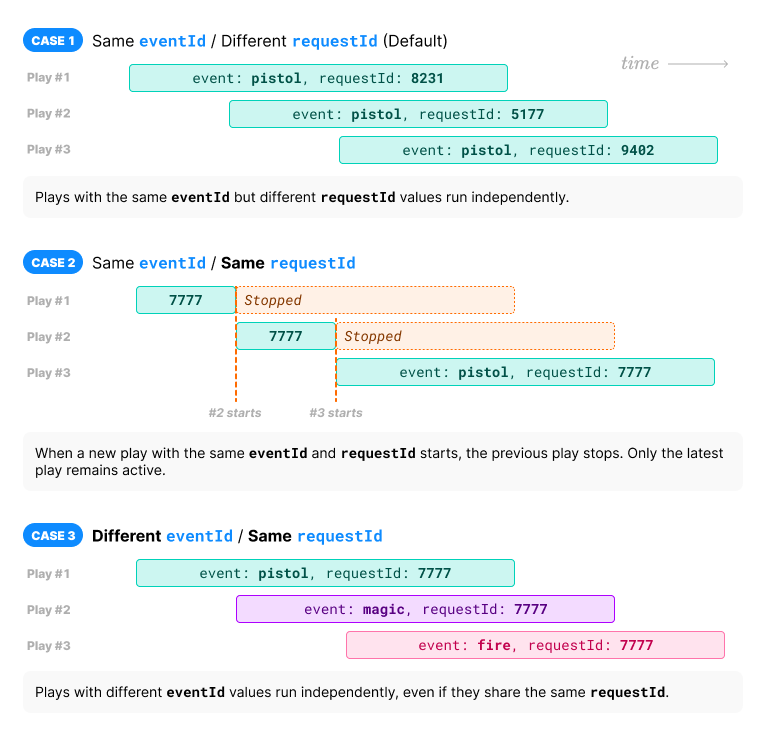
반환값
Request ID입니다. Request ID를 사용하여 햅틱을 중지할 수 있습니다. 반환에 실패하면 -1을 반환합니다.
단, Hub에 연결된 경우에는 Hub가 반환값을 제공하지 않으므로 실패한 호출이 -1을 반환하지 않습니다.
예제
#include "BhapticsSDK2.h"

void AExample::Shoot()
{
    UBhapticsSDK2::PlayHapticWithOption(
        "shootpistol", //  Haptic name
        1.0f, // Haptic intensity
        1.0f, // Haptic duration
        0.0f, // Rotate haptic around global Vector3.up (0f - 360f)
        0.0f  // Move haptic up or down (-0.5f - 0.5f)
    );
}
PlayWithStartTime
static int PlayWithStartTime(FString eventId, int startMillis = 0, float intensity = 1.0f, float duration = 1.0f, float angleX = 0.0f, float offsetY = 0.0f, int requestId = -1);
햅틱의 강도, Duration, 방향을 조정하면서 햅틱 이벤트를 재생합니다.
매개변수
FString eventId: 재생하려는 햅틱 이벤트의 이름입니다.int startMillis: 이벤트 재생을 시작할 위치(ms)입니다. 앞쪽startMillisms는 건너뜁니다(재생 전 지연이 아니라 시작 오프셋입니다). 기본값은0입니다. Windows/macOS/Android only.float intensity: 햅틱 Intensity에 이 값이 곱해집니다.float duration: 햅틱 Duration에 이 값이 곱해집니다.float angleX: 전역Vector3.up을 중심으로 햅틱을 반시계 방향으로 회전합니다. 유효 범위: [0.0f-360.0f]float offsetY: 햅틱을 위 또는 아래로 이동합니다. 유효 범위: [-0.5f-0.5f]int requestId: 무작위 ID 대신 사용할 요청 ID를 지정합니다. 유효한 값은0이상입니다. 생략하거나 음수를 지정하면 무작위 ID가 할당됩니다.요청 ID 재사용
일반적으로 다른 햅틱이 재생 중일 때 햅틱을 재생하면, 새 재생이 현재 재생 위에 겹쳐서 실행됩니다. 하지만 현재 햅틱과 같은
eventId와requestId로 재생하면, 현재 재생이 중지되고 새 재생이 시작됩니다. 이를 통해 짧은 간격으로 반복 재생할 때 각 햅틱이 더 뚜렷하게 느껴지고 햅틱이 겹겹이 쌓이지 않습니다.
반환값
Request ID입니다. Request ID를 사용하여 햅틱을 중지할 수 있습니다. 반환에 실패하면 -1을 반환합니다.
단, Hub에 연결된 경우에는 Hub가 반환값을 제공하지 않으므로 실패한 호출이 -1을 반환하지 않습니다.
예제
#include "BhapticsSDK2.h"

void AExample::Shoot()
{
    UBhapticsSDK2::PlayWithStartTime(
        "shootpistol", //  Haptic name
        0,    // 재생 시작 위치(밀리초)
        1.0f, // Haptic intensity
        1.0f, // Haptic duration
        0.0f, // Rotate haptic around global Vector3.up (0f - 360f)
        0.0f  // Move haptic up or down (-0.5f - 0.5f)
    );
}
PlayLoop
static int PlayLoop(FString eventId, float intensity = 1.0f, float duration = 1.0f, float angleX = 0.0f, float offsetY = 0.0f, int interval = 200, int maxCount = 999999);
햅틱을 반복적으로 재생합니다. 추가로, PlayHapticWithOption 함수처럼 햅틱의 강도, Duration, 방향을 조정할 수 있습니다.
매개변수
FString eventId: 재생하려는 햅틱 이벤트의 이름입니다.float intensity: 햅틱 Intensity에 이 값이 곱해집니다.float duration: 햅틱 Duration에 이 값이 곱해집니다.float angleX: 전역Vector3.up을 중심으로 햅틱을 반시계 방향으로 회전합니다. 유효 범위: [0.0f-360.0f]float offsetY: 햅틱을 위 또는 아래로 이동합니다. 유효 범위: [-0.5f-0.5f]int interval: 루프 사이의 시간 간격으로, 밀리초 단위입니다.int maxCount: 루프 횟수입니다.
반환값
Request ID입니다. Request ID를 사용하여 햅틱을 중지할 수 있습니다. 반환에 실패하면 -1을 반환합니다.
단, Hub에 연결된 경우에는 Hub가 반환값을 제공하지 않으므로 실패한 호출이 -1을 반환하지 않습니다.
예제
#include "BhapticsSDK2.h"

void AExample::Shoot()
{
    UBhapticsSDK2::PlayLoop(
        "shootpistol",  // Haptic name
        1.0f,  // Haptic intensity
        1.0f,  // Haptic duration
        0.0f,  // Rotate haptic around global Vector3.up (0f - 360f)
        0.0f,  // Move haptic up or down (-0.5f - 0.5f)
        200,   // Loop interval time (millisecond)
        999999 // Loop count
    );
}
정적 함수 — 햅틱 직접 재생
새 이벤트를 만들지 않고 햅틱을 재생하려면 이 함수들을 사용하시기 바랍니다.
PlayDot
static int PlayDot(int position, TArray<int> motorValues, float seconds = 0.5f);
특정 햅틱 액추에이터에서 햅틱 피드백을 재생합니다. 이벤트를 만들지 않고도 이 함수를 사용할 수 있습니다.
매개변수
int position: 햅틱 디바이스의 유형입니다. 자세한 내용은 여기를 참고하시기 바랍니다.값 디바이스 동일 항목... 모터 수 0TactSuit Pro EBhapticsDevicePosition::Vest32 1TactSleeve(Left) EBhapticsDevicePosition::ForearmL3 2TactSleeve(Right) EBhapticsDevicePosition::ForearmR3 3TactVisor EBhapticsDevicePosition::Head4 4Tactosy for Hands(Left) EBhapticsDevicePosition::HandL3 5Tactosy for Hands(Right) EBhapticsDevicePosition::HandR3 6Tactosy for Feet(Left) EBhapticsDevicePosition::FootL3 7Tactosy for Feet(Right) EBhapticsDevicePosition::FootR3 8TactGlove(Left) EBhapticsDevicePosition::GloveL8 9TactGlove(Right) EBhapticsDevicePosition::GloveR8 TArray<int> motorValues: 디바이스의 모터 수에 맞게 배열 길이를 지정합니다. 배열의 값은 모터의 Intensity를 의미합니다. 배열의 각 값의 유효 범위: [0-100]float seconds: 햅틱의 Duration으로, 초 단위입니다.0.1f이상을 권장합니다.
반환값
Request ID입니다. Request ID를 사용하여 햅틱을 중지할 수 있습니다. 반환에 실패하면 -1을 반환합니다.
단, Hub에 연결된 경우에는 Hub가 반환값을 제공하지 않으므로 실패한 호출이 -1을 반환하지 않습니다.
예제
#include "BhapticsSDK2.h"

void AExample::Shoot()
{
 // TactSuit Pro는 32개 모터이므로 배열 길이도 32여야 합니다.
    TArray<int> MotorValueArray = TArray<int>{
        50, 40, 30, 20, 10, 50, 40, 30,
        50, 40, 30, 20, 10, 50, 40, 30,
        50, 40, 30, 20, 10, 50, 40, 30,
        50, 40, 30, 20, 10, 50, 40, 30};

    UBhapticsSDK2::PlayDot(
        (int)EBhapticsDevicePosition::Vest, // Device type
        MotorValueArray,                    // Haptic intensities
        0.5f                                // 햅틱 지속 시간(초)
    );
}
PlayPath
static int PlayPath(int position, TArray<float> x, TArray<float> y, TArray<int> motorValues, float seconds = 0.5);
특정 좌표 주변에서 햅틱을 재생합니다. 각 햅틱 액추에이터별로 햅틱 Intensity를 개별 지정하는 PlayDot 함수와 달리, 이 방법은 특정 좌표에 대해 햅틱 Intensity를 지정합니다.
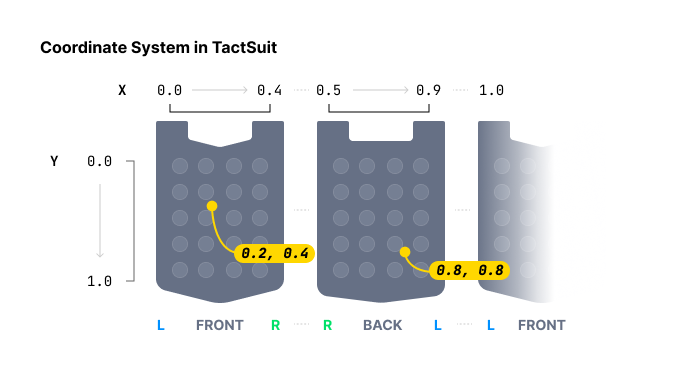
햅틱 위치를 지정할 때, PlayDot은 이산적인 제어를 제공하는 반면 PlayPath는 더 연속적입니다. PlayDot은 개별 액추에이터에 Intensity를 할당하지만, PlayPath는 특정 좌표(X축과 Y축 모두 0과 1 사이)에 Intensity를 할당하여 주변 액추에이터가 그에 맞게 진동하도록 합니다.
배열에 여러 좌표와 여러 Intensity를 넣을 수 있습니다. 배열에 있는 이 좌표들 주변의 모든 액추에이터는 순차적으로가 아니라 동시에(같은 시각에) 작동한다는 점에 유의하시기 바랍니다. 또한 모든 배열의 크기는 같아야 합니다.
값을 점진적으로 변경하면서 이 함수를 계속 호출하면, 햅틱 지점이 이동하는 효과를 얻을 수 있습니다.
[TactGlove DK3] PlayPath는 DK3 글러브의 손목 voice-coil motor(VCM)를 구동하지 않습니다.
매개변수
int position: 햅틱 디바이스의 유형입니다.값 디바이스 동일 항목... 0TactSuit Pro EBhapticsDevicePosition::Vest1TactSleeve(Left) EBhapticsDevicePosition::ForearmL2TactSleeve(Right) EBhapticsDevicePosition::ForearmR3TactVisor EBhapticsDevicePosition::Head4Tactosy for Hands(Left) EBhapticsDevicePosition::HandL5Tactosy for Hands(Right) EBhapticsDevicePosition::HandR6Tactosy for Feet(Left) EBhapticsDevicePosition::FootL7Tactosy for Feet(Right) EBhapticsDevicePosition::FootR8TactGlove(Left) EBhapticsDevicePosition::GloveL9TactGlove(Right) EBhapticsDevicePosition::GloveRTArray<float> x: X 좌표를 지정합니다. 배열의 각 값의 유효 범위: [0.0f-1.0f]TArray<float> y: Y 좌표를 지정합니다. 배열의 각 값의 유효 범위: [0.0f-1.0f]TArray<int> motorValues: 좌표 수에 맞게 배열 길이를 지정합니다. 배열의 값은 좌표의 Intensity를 의미합니다. 배열의 각 값의 유효 범위: [0-100]float seconds: 햅틱의 Duration으로, 초 단위입니다.0.1f이상을 권장합니다.
반환값
Request ID입니다. Request ID를 사용하여 햅틱을 중지할 수 있습니다. 반환에 실패하면 -1을 반환합니다.
단, Hub에 연결된 경우에는 Hub가 반환값을 제공하지 않으므로 실패한 호출이 -1을 반환하지 않습니다.
예제
#include "BhapticsSDK2.h"

/* Assumption:
 - For TactSuit Pro
 - Coordinate with Intensity
    - (X: 0.1, Y: 0.2) Intensity 40
    - (X: 0.3, Y: 0.4) Intensity 80
    - (X: 0.5, Y: 0.6) Intensity 10
  - Duration 0.5 second
*/
void AExample::Shoot()
{
    UBhapticsSDK2::PlayPath(
        (int)EBhapticsDevicePosition::Vest, // Device Type
        TArray<float>{0.1f, 0.3f, 0.5f},    // X Coordinates
        TArray<float>{0.2f, 0.4f, 0.6f},    // Y Coordinates
        TArray<int>{40, 80, 10},            // Intensities
        0.5f                                // Duration
    );
}
PlayWaveform
static int PlayWaveform(int position, TArray<int> motorIntensities, TArray<EBhapticsGlovePlayTime> playTimeValues, TArray<EBhapticsGloveShapeValue> shapeValues, int frequency = 80, int repeatCount = 0);
TactGlove 전용. TactGlove에서 햅틱을 재생합니다. PlayDot을 사용할 때와 달리, 햅틱 Duration과 진동 Intensity 변화를 세밀하게 조정할 수 있습니다. 이를 통해 햅틱 피드백을 더욱 정교하게 표현할 수 있습니다.
각 배열(motorIntensities, playTimeValues, shapeValues)은 TactGlove DK2의 경우 6개, TactGlove DK3의 경우 8개의 요소를 가져야 하며, 세 배열의 길이는 모두 같아야 합니다. 그 외의 길이는 -1을 반환합니다.
매개변수
-
int position: 햅틱 디바이스의 유형입니다.값 디바이스 동일 항목… 8TactGlove(Left) EBhapticsDevicePosition::GloveL9TactGlove(Right) EBhapticsDevicePosition::GloveR -
TArray<int> motorIntensities: 각 모터의 Intensity를 나타내는 배열입니다. 배열의 길이는 TactGlove의 모터 수와 일치해야 합니다. 6개(TactGlove DK2) 또는 8개(TactGlove DK3)입니다. (아래 표의) 배열 인덱스6과7에 있는 손바닥 모터는 DK3에만 존재합니다. 배열의 각 값의 유효 범위: [0-100]배열 인덱스 모터 위치… 0엄지손가락 끝 1검지손가락 끝 2중지손가락 끝 3약지손가락 끝 4새끼손가락 끝 5손목 위 6손바닥 (엄지 쪽) 7손바닥 (새끼손가락 쪽) -
TArray<EBhapticsGlovePlayTime> playTimeValues:motorIntensities와 길이가 같은 배열(DK2는 6개, DK3는 8개)로, 각 요소는 작동 시간 간격을 나타내며, 시간은EBhapticsGlovePlayTimeenum으로 정의됩니다.값 Duration 동일 항목… EBhapticsGlovePlayTime::None없음 0EBhapticsGlovePlayTime::FiveMS5ms 1EBhapticsGlovePlayTime::TenMS10ms 2EBhapticsGlovePlayTime::TwentyMS20ms 4EBhapticsGlovePlayTime::ThirtyMS30ms 6EBhapticsGlovePlayTime::FortyMS40ms 8 -
TArray<EBhapticsGloveShapeValue> shapeValues:motorIntensities와 길이가 같은 배열(DK2는 6개, DK3는 8개)로, 각 요소는 시간에 따른 햅틱 Intensity 변화의 형태를 나타내며,EBhapticsGloveShapeValueenum으로 지정됩니다.값 웨이브폼 동일 항목… EBhapticsGloveShapeValue::ConstantDuration 동안 일정한 Intensity 0EBhapticsGloveShapeValue::Decreasing지정된 Intensity로 시작하여 절반까지 감소 1EBhapticsGloveShapeValue::Increasing지정된 Intensity의 절반으로 시작하여 지정된 Intensity까지 증가합니다. 2[TactGlove DK3] DK3 글러브에서는 손목 액추에이터(배열 인덱스
5)가 voice-coil motor(VCM)이므로shapeValues를 반영하지 않습니다. 나머지 7개 모터는 DK2 글러브와 동일하게 웨이브폼 형태가 적용됩니다. -
int frequency: [TactGlove DK3 전용] DK3 글러브 자체 액추에이터의 진동 주파수(Hz)입니다. 기본값은80입니다. DK3 글러브 자체에만 영향을 주며, 연결된 다른 디바이스의 작동 주파수는 변경하지 않습니다. DK2 글러브나 범용(non-Windows/macOS) 경로에는 영향을 주지 않습니다. Windows/macOS only. -
int repeatCount: 웨이브폼을 반복할 횟수이며1부터 셉니다.0은 한 번만 재생합니다. Windows/macOS only.
반환값
Request ID입니다. Request ID를 사용하여 햅틱을 중지할 수 있습니다. 반환에 실패하면 -1을 반환합니다.
단, Hub에 연결된 경우에는 Hub가 반환값을 제공하지 않으므로 실패한 호출이 -1을 반환하지 않습니다.
예제
#include "BhapticsSDK2.h"

void AExample::Shoot()
{
    TArray<int> GloveMotorValue = TArray<int>{50, 50, 50, 50, 50, 50, 50, 50};

    TArray<EBhapticsGlovePlayTime> GlovePlayTime = {
        EBhapticsGlovePlayTime::FiveMS, EBhapticsGlovePlayTime::TenMS,
        EBhapticsGlovePlayTime::TwentyMS, EBhapticsGlovePlayTime::ThirtyMS,
        EBhapticsGlovePlayTime::FortyMS, EBhapticsGlovePlayTime::None,
        EBhapticsGlovePlayTime::None, EBhapticsGlovePlayTime::None};

    TArray<EBhapticsGloveShapeValue> GloveShapeValue = {
        EBhapticsGloveShapeValue::Constant, EBhapticsGloveShapeValue::Decreasing,
        EBhapticsGloveShapeValue::Increasing, EBhapticsGloveShapeValue::Constant,
        EBhapticsGloveShapeValue::Decreasing, EBhapticsGloveShapeValue::Increasing,
        EBhapticsGloveShapeValue::Constant, EBhapticsGloveShapeValue::Constant};

    UBhapticsSDK2::PlayWaveform(
        (int)EBhapticsDevicePosition::GloveL, // Device Type
        GloveMotorValue,                      // Intensities
        GlovePlayTime,                        // Intervals
        GloveShapeValue                       // Intensity changing forms
    );
}
정적 함수 — 기타
StopHapticByEventId
static bool StopHapticByEventId(FString eventId);
Event ID로 햅틱 이벤트를 중지합니다. 중지 성공 여부를 반환합니다.
#include "BhapticsSDK2.h"

void AExample::Example()
{
    UBhapticsSDK2::StopHapticByEventId("eventID");
}
StopHapticByRequestId
static bool StopHapticByRequestId(int requestId);
햅틱을 실행하는 함수의 반환값인 Request ID를 사용하여 햅틱 이벤트를 중지합니다. 중지 성공 여부를 반환합니다.
#include "BhapticsSDK2.h"

void AExample::Example()
{
    int RequestID = UBhapticsSDK2::PlayHaptic("eventID");
    UBhapticsSDK2::StopHapticByRequestId(RequestID);
}
StopHaptic
static bool StopHaptic();
현재 재생 중인 모든 햅틱을 중지합니다. 중지 성공 여부를 반환합니다.
#include "BhapticsSDK2.h"

void AExample::Example()
{
    UBhapticsSDK2::PlayHaptic("bangbang");
    UBhapticsSDK2::PlayHaptic("eventID");
    UBhapticsSDK2::PlayHaptic("explosion");

    UBhapticsSDK2::StopHaptic();
}
PauseHapticByEventId
static void PauseHapticByEventId(FString eventId);
Event ID로 햅틱 이벤트를 일시 정지합니다. 재생 위치가 유지되어 나중에 ResumeHapticByEventId로 이어서 재생할 수 있습니다.
#include "BhapticsSDK2.h"

void AExample::Example()
{
    UBhapticsSDK2::PauseHapticByEventId("eventID");
}
ResumeHapticByEventId
static void ResumeHapticByEventId(FString eventId);
PauseHapticByEventId로 일시 정지했던 햅틱 이벤트를 일시 정지된 위치에서 이어서 재생합니다.
#include "BhapticsSDK2.h"

void AExample::Example()
{
    UBhapticsSDK2::ResumeHapticByEventId("eventID");
}
IsPlaying
static bool IsPlaying();
햅틱이 재생 중인지 확인합니다.
#include "BhapticsSDK2.h"

void AExample::Example()
{
    if (UBhapticsSDK2::IsPlaying())
    {
        StopHaptic();
    }
}
IsPlayingByEventId
static bool IsPlayingByEventId(FString eventId);
이 Event ID에 해당하는 햅틱 이벤트가 재생 중인지 확인합니다.
#include "BhapticsSDK2.h"

void AExample::Example()
{
    UBhapticsSDK2::PlayHaptic("eventID");

    if (UBhapticsSDK2::IsPlayingByEventId("eventID"))
    {
        UBhapticsSDK2::StopHapticByEventId("eventID");
    }
}
IsPlayingByRequestId
static bool IsPlayingByRequestId(int requestId);
이 Request ID에 해당하는 햅틱 이벤트가 재생 중인지 확인합니다.
#include "BhapticsSDK2.h"

void AExample::Example()
{
    int RequestID = UBhapticsSDK2::PlayHaptic("eventID");
    if (UBhapticsSDK2::IsPlayingByRequestId(RequestID))
    {
        UBhapticsSDK2::StopHapticByRequestId(RequestID);
    }
}
Initialize
static void Initialize();
햅틱 환경을 초기화합니다. 햅틱 관련 함수를 사용하기 전에 이 함수를 호출해야 합니다.
Ping
static void Ping(FBhapticsDevice device);
특정 디바이스에 간단한 햅틱 피드백을 전송합니다.
PingAll
static void PingAll();
연결된 모든 디바이스에 간단한 햅틱 피드백을 전송합니다.
Destroy
static void Destroy();
햅틱 환경을 해제합니다. 이 함수는 게임이 종료될 때 호출해야 하며, 반드시 한 번만 호출해야 합니다.
GetBhapticsDevices
static TArray<FBhapticsDevice> GetBhapticsDevices();
연결된 햅틱 디바이스 정보의 배열을 가져옵니다.
IsBhapticsAvailable
static bool IsBhapticsAvailable();
햅틱 환경이 초기화되어 햅틱 관련 함수를 사용할 준비가 되었는지 확인합니다.
ProjectToVest
static FBhapticsRotationOption ProjectToVest(
    FVector ContactLocation,
    UPrimitiveComponent* PlayerComponent,
    float HalfHeight = 0
);
플레이어로부터 주어진 충돌 접촉 지점의 Offset 값(각도와 높이)을 계산하는 헬퍼 함수입니다. 이 Offset 값은 햅틱 위치를 조정할 수 있는 PlayHapticWithOption과 PlayLoop에서 사용할 수 있습니다.
이 함수는 정면 방향이 베스트의 앞면과 일치한다고 가정하며, 플레이어의 위치를 원점으로 간주합니다.
자세한 내용은 아래 예제를 확인하시기 바랍니다.
매개변수
FVector ContactLocation: 전역 좌표계의 접촉 지점입니다.UPrimitiveComponent* PlayerComponent: 플레이어에 부착된 프리미티브 컴포넌트에 대한 참조입니다.float HalfHeight: 플레이어 실제 키의 절반 값으로, 센티미터 단위입니다.
예제
VR 게임에서 총에 맞았을 때의 햅틱을 구현한다고 가정해 보겠습니다. 이 이벤트에 해당하는 햅틱 패턴은 TactSuit 정면 중앙의 짧고 강한 햅틱 피드백일 것입니다. 현실감을 높이려면, 플레이어가 총에 맞은 위치에 따라 햅틱 피드백의 높이와 각도를 다르게 하는 것이 이상적입니다.
PlayHapticWithOption과 PlayLoop 함수를 사용하면 햅틱 패턴의 높이와 각도를 조정할 수 있습니다. 이 함수들은 햅틱 조정을 위해 각도(OffsetAngleX)와 높이(OffsetY) 값을 받습니다.
ProjectToVest 함수는 플레이어가 총에 맞은 위치, 플레이어의 트랜스폼 정보, 사용자의 키를 기반으로 각도와 높이 값을 계산합니다. 이 값들은 FBhapticsRotationOption 구조체에 담겨 반환됩니다.
-08a69024da438d538cc3301a1ecab27f.png)
#include "BhapticsSDK2.h"

void AExample::HitByBullet()
{
    APawn *PlayerPawn = UGameplayStatics::GetPlayerPawn(GetWorld(), 0);
    UPrimitiveComponent *PlayerComponent = Cast<UPrimitiveComponent>(PlayerPawn->GetRootComponent());

    FVector ContactLocation = USomewhere::GetContactLocationSomehow();
    float HalfHeight = YourActualHeight / 2;

    FBhapticsRotationOption result = UBhapticsSDK2::ProjectToVest(ContactLocation, PlayerComponent, HalfHeight);

    UBhapticsSDK2::PlayHapticWithOption("hit_by_bullet", 1.0f, 1.0f, result.OffsetAngleX, result.OffsetY);
}
ProjectToVestLocation
static FBhapticsRotationOption ProjectToVestLocation(FVector ContactLocation, FVector PlayerLocation, FRotator PlayerRotation);
접촉 위치와 플레이어 트랜스폼 정보로부터 Offset 값을 계산하는 헬퍼 함수입니다. ProjectToVest와 비슷하지만, 각도 Offset(OffsetAngleX)만 계산합니다. 높이(OffsetY)는 항상 0입니다.
매개변수
FVector ContactLocation: 전역 좌표계의 접촉 지점입니다.FVector PlayerLocation: 플레이어의 위치입니다.FRotator PlayerRotation: 플레이어의 회전입니다.
CustomProjectToVest
static FBhapticsRotationOption CustomProjectToVest(FVector ContactLocation, UPrimitiveComponent* PlayerComponent, float HalfHeight = 0, FVector UpVector = FVector::ZeroVector, FVector ForwardVector = FVector::ZeroVector);
충돌로부터 Offset 값을 계산하는 헬퍼 함수입니다. ProjectToVest와 동일한 기능을 수행하지만, Forward 및 Up 벡터를 변경할 수 있습니다.
FVector ContactLocation: 전역 좌표계의 접촉 지점입니다.UPrimitiveComponent* PlayerComponent: 플레이어에 부착된 프리미티브 컴포넌트에 대한 참조입니다.float HalfHeight: 플레이어 실제 키의 절반 값으로, 센티미터 단위입니다.FVector UpVector: Offset 계산의 기준이 되는 위쪽 방향 벡터입니다.FVector ForwardVector: Offset 계산의 기준이 되는 정면 방향 벡터입니다.