参考
BhapticsKit 类提供了从 Swift 控制 bHaptics 触觉设备的函数。它使您能够连接触觉设备、播放触觉模式、直接控制设备马达,以及管理触觉播放。
import BhapticsPlugin

let kit = BhapticsKit()
播放触觉的函数会返回一个请求 ID。您可以用它来检查或停止播放。
生命周期
init
init()
init(delegate: BhapticsKitDelegate?)
创建 SDK 实例。请创建一个实例,并在应用的整个生命周期内保留它。
在 iOS 和 visionOS 上,创建实例时会启动 Bluetooth,系统会向用户请求 Bluetooth 权限。
参数
delegate(可选):接收 Bluetooth 和设备状态的变化。请参阅 BhapticsKitDelegate。
initialize
func initialize(appId: String, apiKey: String, defaultSetting: String) async -> Bool
func initialize(appId: String, apiKey: String, defaultSetting: String)
初始化触觉环境。在使用事件相关函数之前,应调用此函数。
- 在 iOS 和 visionOS 上,它会从服务器下载您的触觉应用的触觉事件。
- 在 macOS 上,它会连接到 bHaptics Player。如果 bHaptics Player 已安装但未运行,它会启动 bHaptics Player。
非 async 版本会在后台执行相同的初始化,但不返回结果。
参数
appId:在 bHaptics Developer Portal 中创建的应用程序 ID。apiKey:在 bHaptics Developer Portal 中创建的 API 密钥。defaultSetting:传入一个空字符串("")。
返回值
初始化是否成功。
示例
let result = await kit.initialize(appId: "your_app_id", apiKey: "your_api_key", defaultSetting: "")
print("Initialization result: \(result)")
delegate
var delegate: BhapticsKitDelegate?
接收 Bluetooth 和设备状态的变化。请参阅 BhapticsKitDelegate。
基于事件的触觉播放
播放绑定到特定事件的触觉模式(在 bHaptics Designer/Portal 中设计)。对于大多数应用程序,这些是推荐使用的函数。
play
func play(eventId: String) -> Int
播放预定义的触觉事件。
参数
eventId:触觉事件的名称。
返回值
请求 ID。您可以用它来停止播放。
示例
let requestId = kit.play(eventId: "heartbeat")
print("Playback request ID: \(requestId)")
playParam
func playParam(
    eventId: String,
    requestId: Int? = nil,
    intensity: Float,
    duration: Float,
    angleX: Float,
    offsetY: Float
) -> Int
调整触觉的强度、Duration 和方向,并播放触觉事件。
参数
eventId:触觉事件的名称。requestId(可选):本次播放使用的请求 ID。如果省略,将分配一个随机 ID。intensity:触觉 Intensity 倍数。有效范围:[0.0-2.0](默认值:1.0)duration:Duration 倍数。(默认值:1.0)angleX:将触觉逆时针旋转。有效范围:[0.0-360.0](默认值:0.0)offsetY:将触觉上移或下移。有效范围:[-0.5-0.5](默认值:0.0)
返回值
请求 ID。您可以用它来停止播放。
示例
let requestId = kit.playParam(eventId: "pistol_r", intensity: 1.0, duration: 1.0, angleX: 0.0, offsetY: 0.0)
playLoop
func playLoop(
    eventId: String,
    intensity: Float,
    duration: Float,
    angleX: Float,
    offsetY: Float,
    interval: Int,
    maxCount: Int
) -> Int
循环播放触觉事件。
参数
eventId:触觉事件的名称。intensity:触觉 Intensity 倍数。有效范围:[0.0-2.0](默认值:1.0)duration:Duration 倍数。(默认值:1.0)angleX:将触觉逆时针旋转。有效范围:[0.0-360.0](默认值:0.0)offsetY:将触觉上移或下移。有效范围:[-0.5-0.5](默认值:0.0)interval:循环之间的时间间隔(以毫秒为单位)。maxCount:循环次数。
返回值
请求 ID。您可以用它来停止播放。
示例
let requestId = kit.playLoop(eventId: "heartbeat", intensity: 0.8, duration: 1.0, angleX: 90, offsetY: 0, interval: 150, maxCount: 5)
playWithStartTime
func playWithStartTime(
    eventId: String,
    startMillis: Int,
    intensity: Float,
    duration: Float,
    angleX: Float,
    offsetY: Float
) -> Int
从特定时间点开始播放触觉事件。可用于将触觉与已在播放的媒体同步。
参数
eventId:触觉事件的名称。startMillis:播放的开始时间,以从事件开头起算的毫秒数表示。intensity:触觉 Intensity 倍数。有效范围:[0.0-2.0](默认值:1.0)duration:Duration 倍数。(默认值:1.0)angleX:将触觉逆时针旋转。有效范围:[0.0-360.0](默认值:0.0)offsetY:将触觉上移或下移。有效范围:[-0.5-0.5](默认值:0.0)
返回值
请求 ID。您可以用它来停止播放。
示例
// Start from 1.5 seconds into the event.
let requestId = kit.playWithStartTime(eventId: "music_video", startMillis: 1500, intensity: 1.0, duration: 1.0, angleX: 0, offsetY: 0)
playWithoutResult
func playWithoutResult(eventId: String, intensity: Float, duration: Float, angleX: Float, offsetY: Float)
播放触觉事件而不返回请求 ID(fire-and-forget)。
参数
eventId:触觉事件的名称。intensity:触觉 Intensity 倍数。有效范围:[0.0-2.0](默认值:1.0)duration:Duration 倍数。(默认值:1.0)angleX:将触觉逆时针旋转。有效范围:[0.0-360.0](默认值:0.0)offsetY:将触觉上移或下移。有效范围:[-0.5-0.5](默认值:0.0)
示例
kit.playWithoutResult(eventId: "heartbeat", intensity: 0.8, duration: 1.0, angleX: 90, offsetY: 0.25)
直接播放触觉
如果您想在不使用事件的情况下播放触觉,请使用这些函数。
position 是一个与其他 bHaptics SDK 通用的 Int 值。使用 BhapticsPosition.index 获取该值。请参阅 BhapticsPosition。
playDot
@discardableResult
func playDot(position: Int, durationMillis: Int, arr: [Int]) -> Int
在特定的触觉执行器上播放触觉反馈。
参数
position:要播放的触觉设备类型。有关更多信息,请参考此处。Value Device Motors Count 0TactSuit Pro 32 1TactSleeve(Left) 3 2TactSleeve(Right) 3 3TactVisor 4 4Tactosy for Hands(Left) 3 5Tactosy for Hands(Right) 3 6Tactosy for Feet(Left) 3 7Tactosy for Feet(Right) 3 8TactGlove(Left) 8 9TactGlove(Right) 8 durationMillis:触觉的 Duration(以毫秒为单位)。建议大于或等于100。arr:根据设备的马达数量来指定数组的长度。数组中的值表示马达的 Intensity。数组中每个值的有效范围:[0-100]
返回值
请求 ID。您可以用它来停止播放。
示例
// Sequentially activate 32 motors
let motorsCount = 32

for i in 0..<motorsCount {
    var motors = [Int](repeating: 0, count: motorsCount)
    motors[i] = 50
    kit.playDot(position: BhapticsPosition.Vest.index, durationMillis: 500, arr: motors)
    try await Task.sleep(nanoseconds: 500_000_000)
}
playPath
@discardableResult
func playPath(position: Int, durationMillis: Int, x: [Float], y: [Float], intensity: [Int]) -> Int
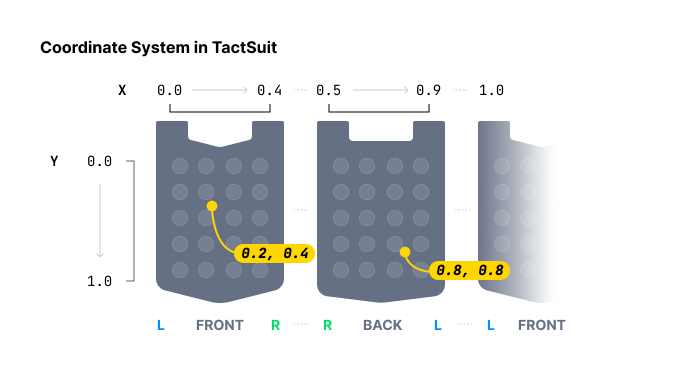
在特定坐标周围播放触觉。与逐个为每个触觉执行器指定触觉 Intensity 的 playDot 函数不同,此方法为特定坐标指定触觉 Intensity。
在指定触觉位置时,playDot 提供离散控制,而 playPath 则更为连续。playDot 为单个执行器分配 Intensity,而 playPath 允许为特定坐标(X 轴和 Y 轴均在 0 到 1 之间)指定 Intensity,从而使附近的执行器相应地振动。
您可以放入多个坐标和多个 Intensity。请注意,数组中这些坐标周围的所有执行器都会**同时(在同一时间)**激活,而不是依次激活。此外,所有数组的大小必须相同。
通过在逐渐改变值的同时持续调用此函数,您可以实现触觉点移动的效果。
参数
position:要播放的触觉设备类型。请参阅playDot中的表格。durationMillis:触觉的 Duration(以毫秒为单位)。建议大于或等于100。x:触觉效果的 X 坐标数组。每个值必须在范围内:[0.0-1.0]y:触觉效果的 Y 坐标数组。每个值必须在范围内:[0.0-1.0]intensity:每个坐标的 Intensity 值数组。长度必须与坐标数量一致。每个值必须在范围内:[0-100]
返回值
请求 ID。您可以用它来停止播放。
示例
// Path of point #1
let x1: [Float] = [0.738, 0.723, 0.709, 0.696, 0.682, 0.667, 0.653]
let y1: [Float] = [0.680, 0.715, 0.749, 0.782, 0.816, 0.852, 0.885]
// Path of point #2
let x2: [Float] = [0.061, 0.072, 0.102, 0.184, 0.254, 0.310, 0.363]
let y2: [Float] = [0.632, 0.587, 0.542, 0.498, 0.411, 0.366, 0.301]

for i in 0..<x1.count {
    // Point #1 and #2 will vibrate at the same time.
    kit.playPath(position: BhapticsPosition.Vest.index, durationMillis: 250, x: [x1[i], x2[i]], y: [y1[i], y2[i]], intensity: [20, 60])
    try await Task.sleep(nanoseconds: 250_000_000)
}
playGlove
@discardableResult
func playGlove(position: Int, points: [GlovePoint], frequency: Int, repeatCount: Int) -> Int
仅限 TactGlove。 在 TactGlove 上播放触觉。与使用 playDot 不同,您可以精细地调整触觉 Duration 和振动 Intensity 的变化。这样可以更详细地表现触觉反馈。
为每个想要驱动的马达传入一个 GlovePoint。至少需要一个点才能工作。
struct GlovePoint {
    var index: Int
    var intensity: Int
    var shape: Int
    var playTime: Int

    init(index: Int, intensity: Int, shape: Int = 0, playTime: Int = 0)
}
参数
-
position:要播放的触觉设备类型。仅使用8或9。Value Device 8TactGlove(Left) 9TactGlove(Right) -
points:GlovePoint数组。-
index:马达的索引。Index 马达所在位置… 0拇指尖 1食指尖 2中指尖 3无名指尖 4小指尖 5手腕处 6手掌(拇指侧) 7手掌(小指侧) -
intensity:马达的 Intensity。有效范围:[0-100] -
playTime:作动的时间间隔。Value Playtimes 15ms 210ms 420ms 630ms 840ms -
shape:触觉 Intensity 随时间变化的形态。Value Waveform 0在该 Duration 内保持恒定 Intensity 1从指定的 Intensity 开始并减小一半 2从指定 Intensity 的一半开始并增大至指定值。
-
-
frequency:手腕马达的振动频率(单位:Hz)。仅适用于 TactGlove DK3。传入0则使用默认值(80)。 -
repeatCount:重复次数。
返回值
请求 ID。您可以用它来停止播放。
示例
let points = (0..<8).map { GlovePoint(index: $0, intensity: 100, shape: 2, playTime: 8) }

// Left hand
kit.playGlove(position: BhapticsPosition.GloveL.index, points: points, frequency: 0, repeatCount: 1)

// Right hand
kit.playGlove(position: BhapticsPosition.GloveR.index, points: points, frequency: 0, repeatCount: 1)
播放控制
stopByRequestId
func stopByRequestId(_ requestId: Int)
通过请求 ID 停止触觉播放。
参数
requestId:触觉播放函数返回的请求 ID。
示例
let requestId = kit.play(eventId: "shoot")
try await Task.sleep(nanoseconds: 2_000_000_000)
kit.stopByRequestId(requestId)
stopByEventId
func stopByEventId(_ eventId: String)
停止特定事件名称的所有触觉播放。
参数
eventId:您想要停止的触觉事件的名称。
stopAll
func stopAll()
停止当前正在播放的所有触觉。
pause
func pause(_ eventId: String)
暂停特定事件的播放。
参数
eventId:您想要暂停的触觉事件的名称。
resume
func resume(_ eventId: String)
恢复特定事件已暂停的播放。
参数
eventId:您想要恢复的触觉事件的名称。
turnOffMotors
func turnOffMotors()
立即关闭所有已连接设备的马达。
状态检查
isPlaying
func isPlaying() -> Bool
检查整体触觉播放状态。无论是基于事件的播放还是直接播放都有效。
isPlayingByRequestId
func isPlayingByRequestId(_ requestId: Int) -> Bool
检查特定请求 ID 的播放状态。无论是基于事件的播放还是直接播放都有效。
isPlayingByEventId
func isPlayingByEventId(_ eventId: String) -> Bool
检查特定事件的播放状态。
getEventList
func getEventList() -> [String]
返回您的触觉应用中触觉事件的名称。该列表在 initialize 完成后可用。
设备管理
在 iOS 和 visionOS 上,SDK 通过 Bluetooth LE 扫描并连接触觉设备。在 macOS 上,设备由 bHaptics Player 管理:扫描和配对函数不起作用,而 getDevices 和 ping 则作用于已连接到 bHaptics Player 的设备。
scan
func scan()
开始扫描附近的 bHaptics 设备。找到的设备会传递给 deviceStateUpdated。已配对的设备在被找到时会自动重新连接。
仅当 Bluetooth 就绪时才会开始扫描。请在 bleStateChange 报告 true 之后调用此函数。
stopScan
func stopScan()
停止扫描。既未配对也未连接的设备将从设备列表中移除。
isScanning
func isScanning() -> Bool
检查 SDK 是否正在扫描。
toggleScanning
func toggleScanning() -> Bool
如果 SDK 正在扫描则停止扫描,否则开始扫描。
返回值
调用后 SDK 是否正在扫描。
pair
func pair(device: BhapticsDevice)
配对并连接设备。SDK 会在应用多次启动之间记住已配对的设备。
参数
device:要配对的设备。可从getDevices或deviceStateUpdated获取。
unpair
func unpair(device: BhapticsDevice)
取消配对并断开设备连接。
参数
device:要取消配对的设备。
getDevices
func getDevices() -> [BhapticsDevice]
返回已找到和已配对的设备。请参阅 BhapticsDevice。
ping
@discardableResult
func ping(device: String) -> Bool
向特定设备发送 ping。设备会短暂振动,以便用户识别它。
参数
device:BhapticsDevice 的uuid。
返回值
ping 是否已发送。
示例
if let device = kit.getDevices().first {
    kit.ping(device: device.uuid)
}
pingAll
@discardableResult
func pingAll() -> Bool
向所有已连接的设备发送 ping。
返回值
ping 是否已发送。
getBluetoothState
func getBluetoothState() -> Int
返回 Bluetooth 状态。可用于判断找不到设备的原因。
| 值 | 状态 |
|---|---|
0 | 未知 |
1 | 正在重置 |
2 | 不支持 |
3 | 未授权(Bluetooth 权限被拒绝) |
4 | 已关闭 |
5 | 已开启 |
仅限 macOS
isPlayerConnected
func isPlayerConnected() -> Bool
检查与 bHaptics Player 的连接状态。在 iOS 和 visionOS 上始终返回 false。
onPlayerConnectionChanged
var onPlayerConnectionChanged: ((Bool) -> Void)?
当与 bHaptics Player 的连接状态发生变化时,在主线程上调用。仅在 macOS 上可用。
示例
#if os(macOS)
kit.onPlayerConnectionChanged = { connected in
    print("bHaptics Player connected: \(connected)")
}
#endif
类型
BhapticsKitDelegate
protocol BhapticsKitDelegate {
    func bHapticsKit(_ kit: BhapticsKit, bleStateChange state: Bool)
    func bHapticsKit(_ kit: BhapticsKit, deviceStateUpdated devices: [BhapticsDevice])
    func bHapticsKit(_ kit: BhapticsKit, didConnect device: BhapticsDevice)
    func bHapticsKit(_ kit: BhapticsKit, didDisconnect device: BhapticsDevice)
}
在 iOS 和 visionOS 上接收 Bluetooth 和设备状态的变化。
bleStateChange:Bluetooth 已就绪(true)或不可用(false)。deviceStateUpdated:设备列表已变化。在设备被找到、配对、取消配对、连接或断开连接时调用。didConnect:设备已连接。didDisconnect:未配对的设备已断开连接。
BhapticsDevice
SDK 找到的触觉设备。
| 属性 | 类型 | 说明 |
|---|---|---|
name | String | 设备名称。 |
uuid | String | 设备的唯一标识符。也可以通过 id 获取。 |
position | PositionType | 设备穿戴的身体部位。 |
battery | Int | 电池电量百分比。未知时为 -1。 |
connected | Bool | 设备是否已连接。 |
paired | Bool | 设备是否已配对。 |
BhapticsPosition
触觉设备的类型。使用 index 将其传递给 playDot、playPath 和 playGlove 等函数。
| Case | index | 设备 |
|---|---|---|
.Vest | 0 | TactSuit |
.ForearmL | 1 | TactSleeve(Left) |
.ForearmR | 2 | TactSleeve(Right) |
.Head | 3 | TactVisor |
.HandL | 4 | Tactosy for Hands(Left) |
.HandR | 5 | Tactosy for Hands(Right) |
.FootL | 6 | Tactosy for Feet(Left) |
.FootR | 7 | Tactosy for Feet(Right) |
.GloveL | 8 | TactGlove(Left) |
.GloveR | 9 | TactGlove(Right) |
let position = BhapticsPosition.GloveL.index // 8